The short answer
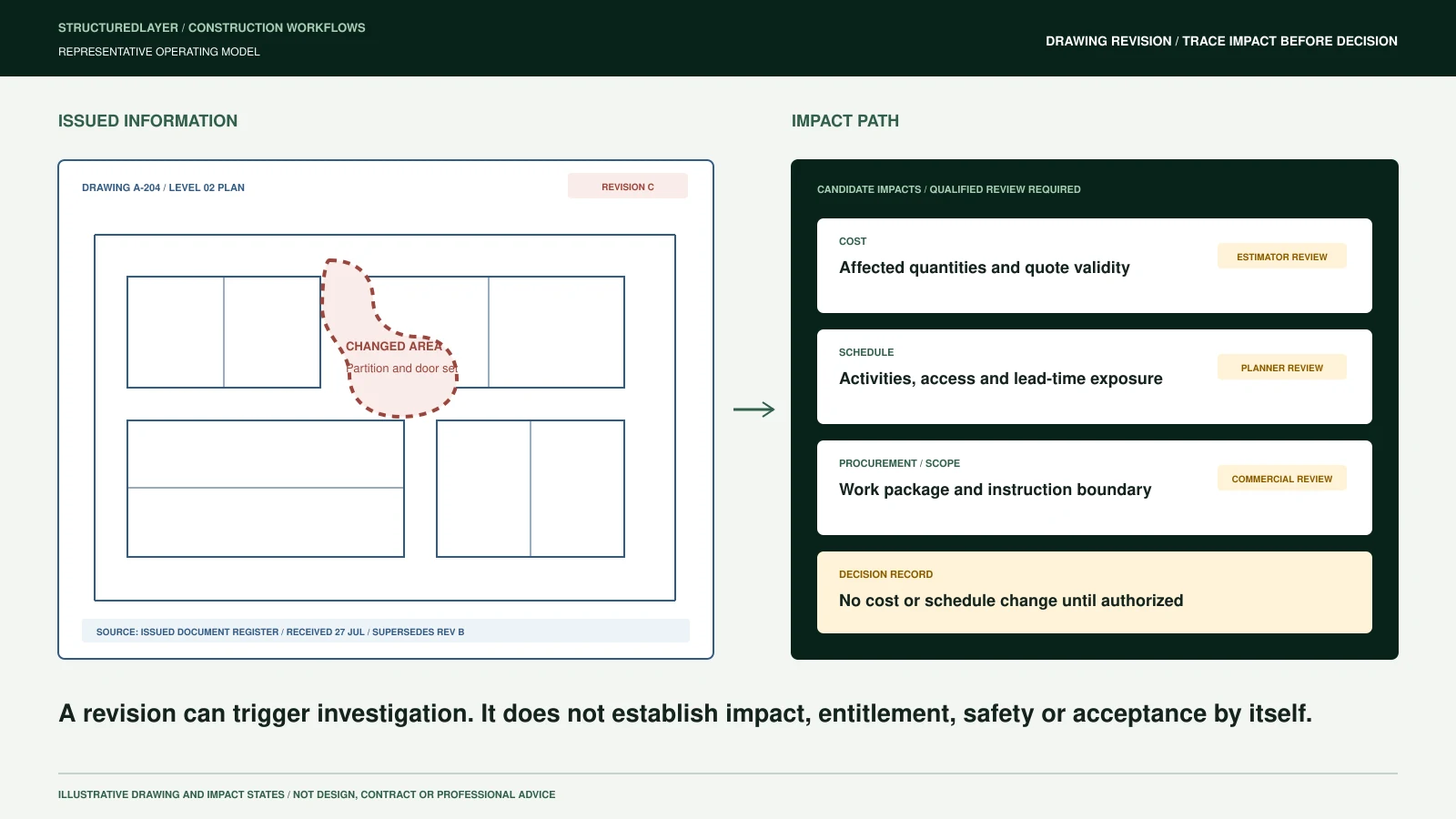
A drawing revision should connect to cost and schedule through a controlled impact record, not through an assumption that every new file automatically changes the project baseline.
The system must first identify the document and revision, establish what it replaces, preserve the source, and route the change to authorized technical and commercial reviewers. Approved effects can then connect to scope items, estimates, contracts, change events, procurement packages, schedule activities, and notifications.
Document comparison can assist review. It does not establish engineering meaning, contractual entitlement, cost, schedule effect, safety impact, or approval by itself.
A new file is not yet a controlled revision
Construction documents arrive through portals, email, common data environments, uploads, shared folders, and integrations. A filename may contain a revision marker, but filenames alone do not establish project identity, discipline, issue purpose, supersession, or authority.
Before downstream action, the workflow should answer:
- Which project and package does this document belong to?
- What document identity and revision does it claim?
- Which source supplied it, and when?
- Does it replace a current version, duplicate an existing file, or conflict with another issue?
- What is the issue purpose and effective status?
- Who is authorized to review its technical and commercial implications?
When any answer is uncertain, the document belongs in a review queue rather than being marked current automatically.
Preserve revision lineage
Revision control requires durable relationships between document versions. Each revision should retain the original file, source reference, received time, originator, project, discipline, package, document number, revision label, issue purpose, and effective state.
The current version should point to the version it supersedes. Superseded history should remain available where required for project, contractual, audit, or regulatory purposes. A current-document view can hide obsolete files from routine use without deleting their lineage.
This distinction matters because the cost or schedule decision may depend on what changed between two specific issues, not merely on the latest file in a folder.
Connect differences to affected scope
A comparison can identify candidate changes in sheets, notes, dimensions, schedules, callouts, quantities, specifications, or referenced details. The output should preserve page or drawing coordinates, source versions, method, confidence, and limitations.
A candidate difference is not yet an approved impact. It should be related to the relevant operating context, which may include:
- Scope item or work package
- Estimate line, allowance, or exclusion
- Contract requirement or clarification
- RFI, submittal, instruction, or change event
- Procurement package, supplier quote, or long-lead item
- Schedule activity, milestone, constraint, or sequence
- Site location, asset, room, zone, or system
- Responsible designer, contractor, subcontractor, or reviewer
The relationship lets reviewers see where a revision may matter without claiming that software has made the professional decision.
Separate technical review from commercial control
Technical interpretation and commercial administration are connected but different responsibilities. The applicable contract, jurisdiction, professional appointments, and organizational policy determine who may decide design meaning, compliance, entitlement, valuation, notice, or schedule effect.
A controlled workflow can route the same revision through separate questions:
- Technical significance: Does an authorized reviewer identify a material change or clarification?
- Scope relationship: Which controlled scope, package, location, or obligation may be affected?
- Commercial status: Is there a potential change event, quotation requirement, instruction, or notice obligation?
- Schedule status: Which activities, milestones, procurement dates, or dependencies require assessment?
- Decision authority: Who may approve no action, request clarification, issue a notice, or update a baseline?
The system preserves these decisions and their evidence. It should not collapse them into a single automated "impact" label.
How cost should be connected
The revision record can create or relate to a controlled commercial event. That event should distinguish potential, submitted, reviewed, approved, rejected, and incorporated states according to the organization's process.
Supporting records may include:
- Affected estimate or budget items
- Quantity or scope comparison prepared for review
- Supplier and subcontractor quotations
- Labour, material, plant, and indirect cost components
- Contract instruction or correspondence
- Assumptions, exclusions, and unresolved questions
- Reviewer, approver, dates, and decision history
A potential amount should not silently change the approved budget or forecast. The appropriate authority must approve how and when a value enters project controls.
How schedule should be connected
The same revision can relate to schedule activities, procurement packages, information-release dates, access constraints, or milestones. A schedule-impact record should identify the affected activity and the basis for review, not just store a free-text note.
Useful fields can include:
- Activity and milestone identifiers
- Current approved schedule version
- Required information or decision date
- Procurement and lead-time dependencies
- Proposed effect and supporting rationale
- Mitigation or resequencing option
- Responsible planner and project owner
- Review, approval, and incorporation state
Planning judgement remains with authorized people. The workflow makes the evidence, dependencies, and decision status visible.
Control notification and acknowledgement
Distributing a file does not prove that affected people received, reviewed, or acted on it. Notifications should follow approved permissions and contractual communication routes.
The workflow may need to record:
- Approved recipient list and communication channel
- Document and revision supplied
- Notice or transmittal reference
- Sent and received timestamps
- Acknowledgement or review requirement
- Failed delivery, missing recipient, or overdue response
- Supersession of prior instructions or work packs
External notices and contractual communications require authorized approval. Automated reminders can support follow-up without implying acceptance.
A controlled revision sequence
A practical sequence is:
- Receive from an approved source.
- Identify project, document, discipline, originator, and reference.
- Version as new, revised, duplicate, superseded, or uncertain.
- Compare specific versions where technically appropriate.
- Relate candidate differences to scope and project records.
- Assess possible technical, cost, schedule, procurement, safety, and contractual implications.
- Decide no action, clarification, controlled change, or another authorized outcome.
- Notify approved affected parties.
- Update current views and approved downstream records.
- Audit sources, comparisons, decisions, recipients, and acknowledgement.
Minimum acceptance tests
Representative tests should confirm that the workflow can:
- Match a document to the correct project without relying only on filename
- Distinguish a duplicate from a genuine revision
- Preserve current and superseded relationships
- Isolate uncertain project or revision matches
- Compare only identified source versions
- Link candidate differences to affected scope records
- Keep technical, commercial, and schedule decisions separately accountable
- Prevent unapproved cost or schedule changes from entering the baseline
- Preserve notification and acknowledgement evidence
- Recover from a failed source, incomplete comparison, or incorrect match
Measures can include current revisions identified, uncertain documents isolated, reviewers assigned, approved impacts linked to change events, and acknowledgements traceable. Results require a real baseline and should not be presented as universal savings.
Begin with one document path
Select one document type and trace how a new revision moves from receipt to current status, impact review, approved action, distribution, and acknowledgement. Record every source, owner, decision, exception, and downstream update.
Use the detailed Document Revision and Change Impact workflow, the data-ingestion controls, and the governance boundaries to define the operating path before adding comparison or notification automation.