
AI Technology Brief
AI can now work across construction software. But should it?
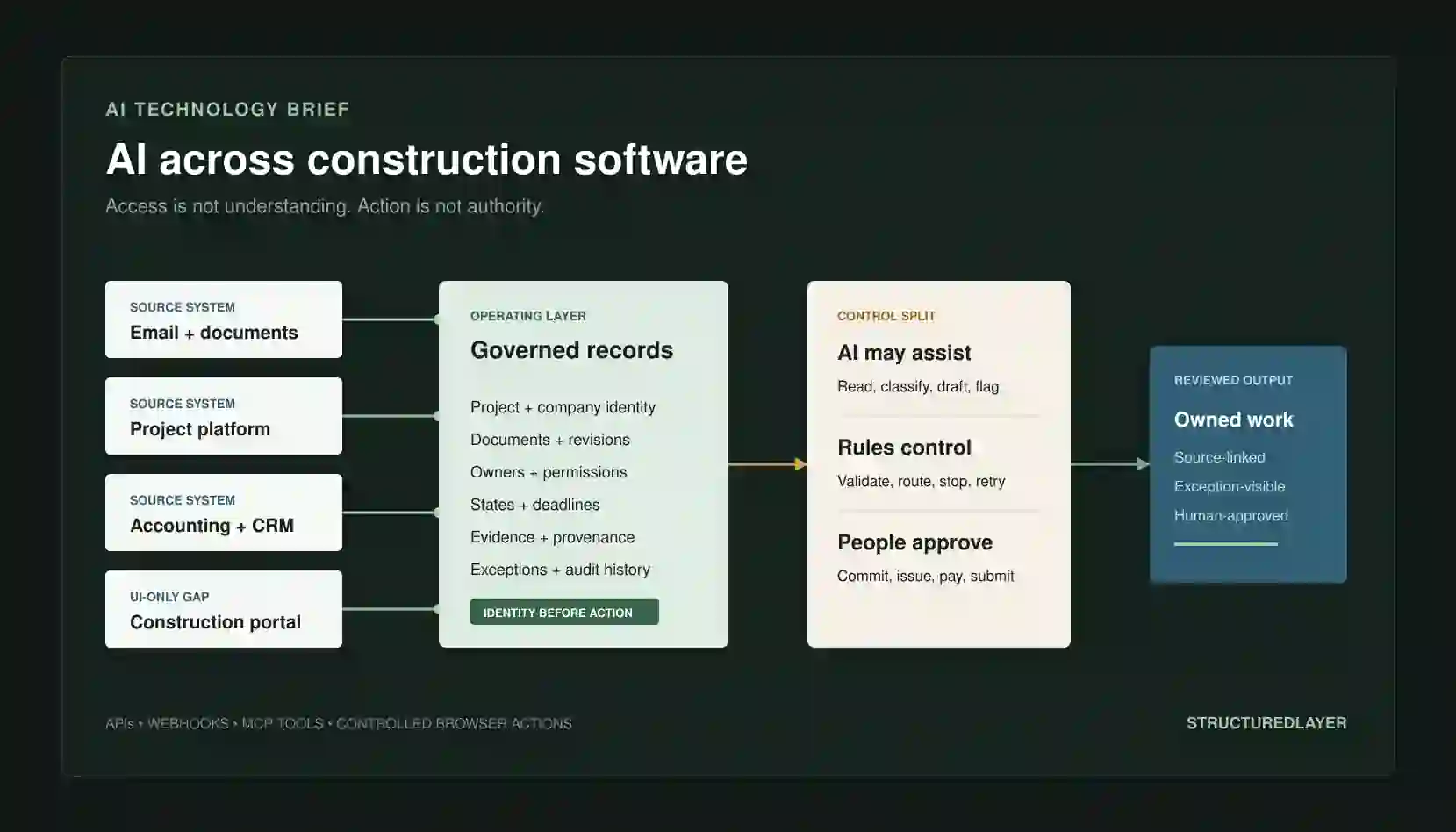
Computer-use agents can navigate software interfaces, while APIs, webhooks, and MCP tools can connect systems more directly. The buyer question is not whether an agent can click a button. It is whether the business can define the right record, permission, state, rule, exception, approval, and accepted outcome around that action.
01 / What happened
Agents can now operate interfaces as well as call structured tools.
Computer-use systems interpret screenshots or interface state and propose mouse, keyboard, or browser actions. APIs, webhooks, and MCP can expose records and operations more directly. These capabilities expand the connection options available to a construction workflow; they do not supply the workflow's business meaning or authority.
02 / Independently verifiable claims
The capability is real, but the safety guidance is part of the release.
- OpenAI and Anthropic document computer-use tools that inspect browser or desktop state and return actions for an application to execute.
- Both providers recommend isolated environments, restricted access, and human confirmation for consequential actions.
- MCP standardizes how an AI host can discover resources and invoke tools, but each server still has to validate inputs and enforce authorization.
- Procore and Autodesk document APIs and webhook mechanisms that can expose supported construction records and events without screen operation.
- On 23 July 2026, Procore announced three generally available Digital Coworker packages, Control Tower usage reporting, an Enterprise-only Agent Studio, and an August 2026 rollout start for customer-defined Skills.
- No cited source claims that an agent automatically understands a contractor's commercial rules, contractual authority, project context, or operating responsibilities.
A recorded demonstration proves that an interface action worked in that case. It does not prove repeatable identity, authorization, recovery, business correctness, or acceptable operating cost across a contractor's live workload.
03 / Procore market update / 23 July 2026
Construction software is packaging agents around company-specific instructions.
Procore's announcement is a relevant market signal because it combines prebuilt construction agents, customer-defined Skills, custom agent tooling, and usage visibility. It verifies product packaging and stated availability; it does not independently verify production accuracy, savings, authority, security, or repeatability for another contractor.
Generally available
Starter Pack
Five prebuilt agents: Deep Search, Submittal Review, RFI, Daily Log, and Contract Review.
Generally available
Digital Coworker Pro
A vendor-described library of 20 agents spanning project planning, bidding, safety, quality, risk management, and other workflows.
Generally available
Digital Coworker Enterprise
Additional agents, advanced customization, and Enterprise-only Agent Studio for custom agents and company-specific workflows.
Available across packages
Control Tower
Administrative visibility into AI usage and credit consumption by agent, project, or team member. The announcement does not document its access-control or audit semantics.
Previewed for rollout beginning August 2026
Procore Skills
Customer-defined instructions and knowledge using prompts, company documents, standard operating procedures, and project standards.
Vendor-announced capability
Named new agents
Site Safety Agent, Schedule Analyst Agent, and Change Analysis Agent are described in the release. Production accuracy and authority boundaries are not independently established.
What the announcement supports
Company-specific configuration is becoming part of the construction software offer.
Procore says Skills can apply company processes, standards, best practices, and institutional knowledge across projects. This supports the buyer need to prepare approved instructions and context. A prompt or uploaded procedure is not automatically a governed workflow rule, current source of truth, permission decision, or accepted business outcome.
What remains unverified
The press release does not answer the full operating question.
- How each agent action is authorized against the current user, project, record, resource, and business purpose
- How company instructions, procedures, and project standards are versioned, approved, superseded, and tested
- How conflicting records, unsupported conclusions, low confidence, and required abstention are handled
- Whether citations establish the current authoritative source rather than merely opening a related document
- Which operations require human approval at the point of commercial, contractual, safety, payment, or external consequence
- Complete implementation cost, credit pricing, review burden, failure recovery, monitoring, support, and maintenance responsibility
Vendor-published customer statement
Procore reports that Haskell reduced one submittal-review process from seven days to ten minutes. The announcement does not provide an independent benchmark, representative sample, baseline definition, reviewer effort, error rate, exception rate, or evidence that the result generalizes. StructuredLayer does not present it as a promised performance outcome.
04 / A normal fragmented workflow
One opportunity can cross six disconnected places before estimating starts.
- 01
Invitation
An RFQ arrives in a personal or shared inbox with attachments and a deadline in the message body.
- 02
Portal
A coordinator signs into a bid portal to confirm addenda, download files, and inspect changed listings.
- 03
Files
Documents move into a project folder where names, revisions, and ownership may differ from the portal.
- 04
Spreadsheet
Opportunity details and qualification notes are copied into a tracker maintained by one team.
- 05
Project system
A project or estimate is created later, often with another identifier and incomplete source history.
- 06
Decision
Estimator capacity, bid or no-bid reasoning, clarifications, and submission approval remain spread across messages and meetings.
05 / Connection methods
Choose the narrowest dependable interface for each part of the work.
The hierarchy is not a contest between technologies. Use supported events and structured interfaces where they meet the requirement; reserve browser operation for the remaining authorized UI-only gap.
Preferred for supported reads and writes
API
A documented contract for records and actions. It can provide stable identifiers and explicit errors, but coverage, scopes, rate limits, and product editions still matter.
Preferred for supported events
Webhook
The source notifies a receiver when an approved event occurs. Delivery must still be authenticated, persisted, deduplicated, retried, and reconciled.
A standard connection layer
MCP
An AI host can discover resources and tools through a negotiated protocol. MCP does not replace source-system permissions, business rules, server-side authorization, or approval.
Fallback for authorized UI-only gaps
Browser agent
The agent interprets screenshots or interface state and proposes clicks or typing. It is more exposed to layout change, prompt injection, session state, ambiguous screens, and recovery cost.
06 / What remains unknown
Software operation is not business understanding.
The agent may observe
- Visible labels, fields, tables, and navigation
- Permitted tool descriptions and response schemas
- Text in approved emails and documents
- Current interface state and prior actions
- Candidate similarities and anomalies
The business must define
- Which project, company, document, and revision control
- Which source has authority when records conflict
- What commercial, contractual, safety, or professional consequence follows
- Who owns the task, exception, decision, and approval
- What completion means and which evidence proves it
07 / StructuredLayer operating model
Records first. Workflow control second. Bounded AI action third.
Data layer
Stable identities, relationships, revisions, permissions, provenance, dates, and evidence across source systems.
Workflow layer
States, owners, validation, deadlines, routing, approvals, exceptions, recovery, and completion evidence.
Automation and AI
APIs, webhooks, tools, browser actions, extraction, drafting, comparison, recommendations, and bounded updates.
08 / Data-layer diagram
The durable output is a connected record, not a successful click.
Project record
Opportunity record
Document record
Company record
Workflow run record
Exception record
09 / Workflow states and ownership
Every run needs a visible state, owner, and next action.
Normal path
- 01 / Observed
- 02 / Matched
- 03 / Validated
- 04 / Prepared
- 05 / Awaiting review
- 06 / Approved
- 07 / Completed
Exception path
- 01 / Rejected input
- 02 / Uncertain identity
- 03 / Missing evidence
- 04 / Permission blocked
- 05 / Retry exhausted
- 06 / Human takeover
- 07 / Resolved
10 / Control split
The model may propose an action. It must not decide whether the action is authorized.
AI may assist
- Read approved pages and records
- Classify messages and documents
- Extract candidate fields
- Suggest record relationships
- Draft summaries and handoffs
- Recommend from a bounded option set
- Flag missing, changed, or unusual information
Rules control
- Authenticate users and services
- Enforce domain and action allowlists
- Validate identifiers, dates, files, and required fields
- Calculate approved formulas
- Apply retry, timeout, and cost limits
- Deduplicate and preserve idempotency
- Block action until approval state is present
People approve
- Accept terms or contractual obligations
- Decide bid, price, award, payment, or submission
- Interpret commercial, professional, safety, and legal consequences
- Approve sensitive-data transmission
- Change permissions or credentials
- Resolve material ambiguity and exceptions
- Authorize external issue and commitments
11 / Portal-monitoring example
Monitor approved information without giving the browser agent authority to pursue it.
Schedule approved check
  -> open allowlisted portal in isolated browser
  -> confirm account, project and page context
  -> apply approved filters
  -> compare listing IDs and fingerprints with prior state
  -> download permitted files
  -> validate file identity, size and completeness
  -> create or update source-linked opportunity record
  -> route new, changed or uncertain items to owner
-> stop before reply, acceptance, bid decision or submission12 / RFQ-to-estimator example
Connect intake and handoff without automating the bid decision.
Capture approved RFQ email and attachments
  -> preserve sender, recipients, message ID and received time
  -> match company, contact, project and opportunity
  -> classify documents and extract candidate fields
  -> validate deadline, attachment integrity and required information
  -> create visible exceptions
  -> assign estimator and require acknowledgement
  -> draft source-linked bid-decision brief
  -> authorized person records bid or no-bid decision
-> pricing, approval and submission remain separate controlled stages13 / Failure, retry and exception handling
A failed action is recoverable only when the workflow knows what happened.
Wrong context
The agent is in the wrong project, account, tenant, record, revision, or browser session.
Interface change
A label, button, ordering rule, authentication step, or page structure changes.
Indirect prompt injection
A webpage, email, document, image, or tool output attempts to redirect the agent or disclose information.
False completion
A download, update, or submission appears successful but the durable business result is incomplete.
Duplicate effect
A retry creates a second record, message, file, or transaction because the action was not idempotent.
Silent business error
The interface action succeeds technically but uses the wrong scope, owner, deadline, or commercial interpretation.
Checkpoint
Persist the last verified state.
Bounded retry
Retry only known transient failures.
Revalidate
Confirm identity and effect before continuing.
Escalate
Stop with evidence and an assigned owner.
14 / Deployment options
Local, cloud, and hybrid choices move responsibility; they do not remove it.
Local or client network
Orchestrator and browser run on managed client infrastructure.
Greater infrastructure control, but the client owns patching, isolation, capacity, observability, and recovery.
Cloud
Workers, queues, sandboxes, state, and monitoring run in an approved cloud environment.
Elastic operation and managed services are available, but data location, egress, tenancy, vendor terms, and recurring charges require review.
Hybrid
Sensitive records remain in client-controlled systems while bounded cloud services process approved tasks.
Can separate trust zones, but identity, networking, failure recovery, source synchronization, and support ownership become more involved.
15 / Infrastructure and operating cost
Measure cost per accepted business outcome, not cost per model call.
No fixed ROI or price is supportable without the source systems, volumes, execution time, provider terms, review effort, failure rate, and operating model. The cost model must include the entire workflow.
Model usage
Input, output, reasoning, images or screenshots, context history, and retries.
Execution
Browser or container runtime, task workers, queues, databases, object storage, and network transfer.
Integration
API access, connector licensing, MCP server operation, source-system editions, and rate-limit handling.
Control
Identity, secrets, policy checks, approvals, logging, monitoring, alerting, backup, and incident response.
Human operation
Review, exception resolution, training, support, maintenance, and change control.
Failure
Abandoned runs, duplicate work, manual rescue, missed deadlines, incorrect updates, and remediation.
16 / Controlled pilot plan
Prove one bounded workflow before expanding access.
- 01
Boundary
One source workflow, defined users, allowed systems, read and write actions, prohibited actions, and named owners.
- 02
Baseline
Representative cases, current time and error baseline, known exceptions, expected outputs, and complete operating cost.
- 03
Controls
Least privilege, isolated execution, action allowlist, source validation, checkpoints, approval gates, and stop states.
- 04
Evaluation
Task success, critical errors, false completion, exception routing, human correction, latency, and cost per accepted outcome.
- 05
Acceptance
Pre-agreed thresholds, zero-tolerance failures, rollback conditions, reviewer signoff, and evidence retention.
- 06
Expansion
Add another action, system, or user group only after the prior boundary remains reliable over repeated runs.
Example zero-tolerance failures
Wrong-project writes, unauthorized external messages, unapproved submissions, sensitive-data transmission outside policy, duplicate commitments, hidden unresolved exceptions, or continuation after identity and authorization become uncertain.
17 / StructuredLayer recommendation
Use AI across construction software only where the business can identify the source record, permitted action, deterministic controls, approval owner, exception path, completion evidence, and complete operating cost. Prefer APIs and webhooks, use MCP to standardize bounded tools and resources, and reserve browser agents for authorized gaps that can stop safely.
Start read-only. Add one prepared update only after retrieval and identity are dependable. Keep commercial, contractual, professional, safety, payment, permission, and external-issue decisions behind application-enforced approval gates.
18 / Primary sources
Capability, protocol, security, and construction-integration claims remain inspectable.
OpenAI API documentation
Computer use
OpenAI
Operator System Card
Anthropic documentation
Computer use tool
Anthropic
Mitigating prompt injection in browser use
Model Context Protocol
Model Context Protocol architecture
Model Context Protocol
MCP tools specification
Model Context Protocol
MCP authorization specification
OWASP
AI Agent Security Cheat Sheet
OWASP Gen AI Security Project
LLM06:2025 Excessive Agency
Autodesk Platform Services
Webhooks API
Procore Developers
Hooks API
Procore
Procore Introduces Digital Coworker Packages, Expands AI Agent Library, and Previews Skills
NIST
Artificial Intelligence Risk Management Framework 1.0
RICS
Responsible use of artificial intelligence in surveying practice
Sources reviewed 29 July 2026. Product capabilities, specifications, pricing, and terms can change; verify the current source before implementation.