The short answer
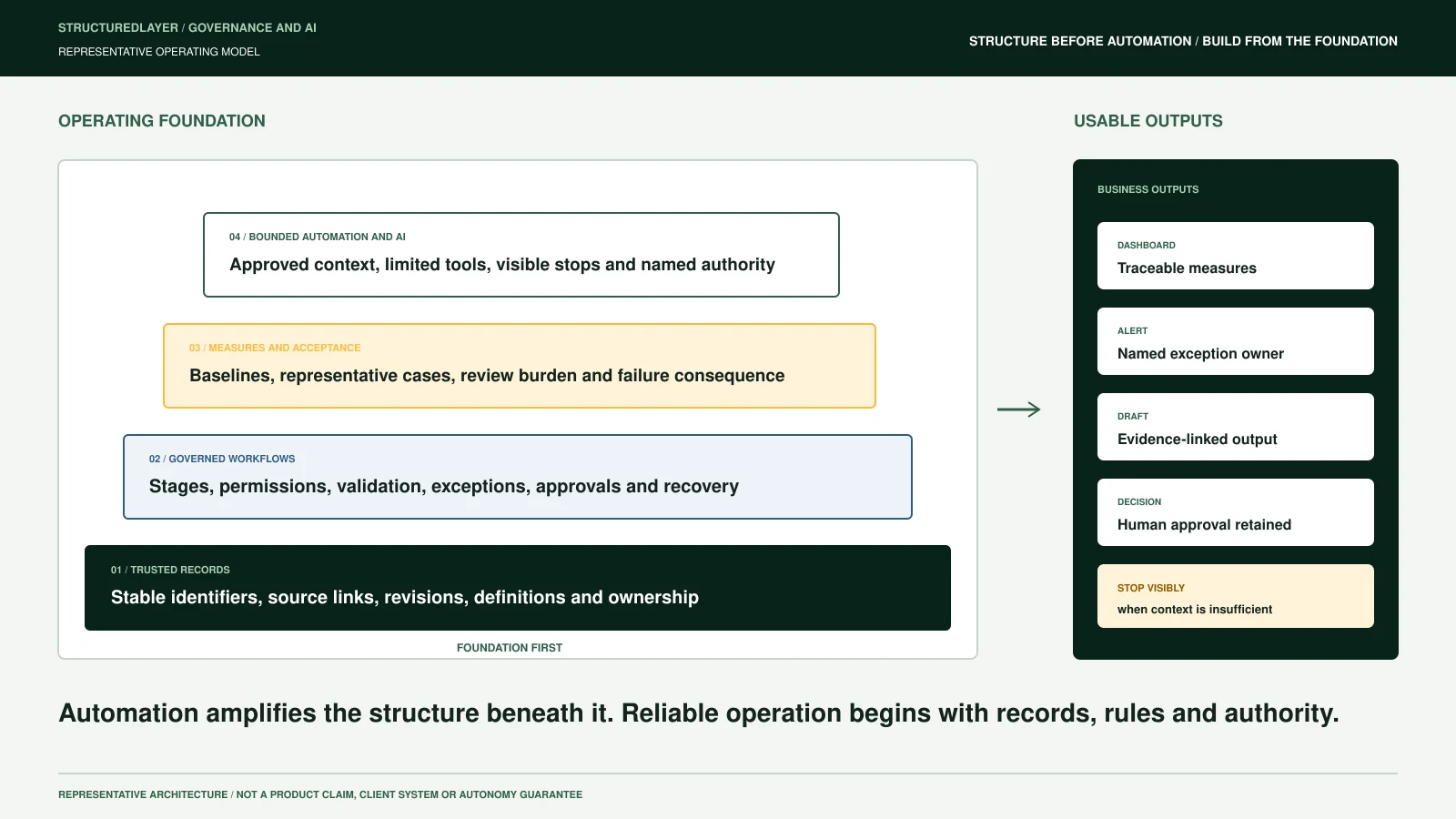
Before automating a construction workflow, structure its identities, sources, states, ownership, permissions, decisions, exceptions, and evidence.
Automation repeats a defined action. It does not decide what a project is called across systems, which drawing revision controls, whether a handoff is complete, who may approve an external submission, or how a failed connection should be recovered. Those are operating decisions that must be made visible first.
The goal is not to clean every record in the company before starting. Choose one bounded workflow and establish enough structure for that workflow to operate, fail, recover, and be handed over responsibly.
1. Structure durable identities
The same company, contact, project, opportunity, RFQ, estimate, document, supplier, contract, and activity may appear under different names in different systems. Automation needs a dependable way to determine whether two records represent the same thing.
Preserve native system identifiers and add shared identities or mapping records where appropriate. Do not merge uncertain matches silently. Possible duplicates should enter review with the source values and evidence still available.
Identity is the foundation for connecting an email to the correct project, a drawing to the correct package, an estimate to the accepted opportunity, or a cost record to the correct reporting period.
2. Define source authority
Connected systems will disagree. A due date may differ between an email, portal, spreadsheet, and project record. A contact may be current in one place and obsolete in another. A document folder may contain several files labelled final.
For each material field, define:
- The preferred or authoritative source
- The conditions under which another source may control
- The accountable owner when sources conflict
- The source reference and retrieval time to preserve
- The resolution and history required
A shared operating record should not erase disagreement. It should make the controlling decision traceable.
3. Represent workflow state
A collection of records does not show how work moves. Structure the trigger, stages, owners, handoffs, deadlines, review gates, completion rule, and possible return paths.
Status labels should describe operating decisions. "In progress" is rarely enough. An RFQ may be awaiting document review, estimator acknowledgement, commercial approval, submission confirmation, or client decision. A subcontractor may have uploaded documents without being reviewed or ready for work.
State lets automation know which action is permitted and what evidence is still missing.
4. Assign ownership and authority
Every stage, exception, and approval needs an accountable role or person. Separate responsibility for preparing information from authority to approve or issue it.
Construction workflows often contain consequential decisions involving price, contract, payment, design, safety, access, insurance, compliance, employment, or external communication. The applicable agreement, policy, jurisdiction, and professional responsibility determine who may act.
Automation can prepare, remind, route, compare, and draft. It should not imply that a generated output or system transition is authorized when the required person has not approved it.
5. Structure permissions and sensitivity
Access should follow the user, role, project, organization, sensitivity, contractual restriction, and business purpose. Least privilege applies to people, integrations, service accounts, reporting layers, and AI tools.
Before connecting a source, document:
- Which records the process may read and write
- Which fields or attachments are restricted
- How credentials are stored and rotated
- Which actions require separate approval
- What the provider logs, retains, or uses
- How access is removed at handover or termination
Do not request passwords, MFA codes, unrestricted credential exports, or unnecessary production records through intake forms or ordinary communication.
6. Design exceptions before the happy path
A workflow is not controlled if it works only when every input is complete and every system is available.
Structure the expected exception classes:
- Possible duplicate or uncertain identity
- Missing or stale source
- Conflicting date, value, or status
- Unsupported file or low-confidence extraction
- Failed API, changed export, or altered browser interface
- Permission denial or expired credential
- Partial write or duplicate event
- Missing owner or overdue approval
- External delivery without confirmation
Each exception needs a visible queue, owner, priority, evidence, permitted resolution, and escalation rule. The process also needs monitoring, recovery, and a disable path.
7. Preserve evidence and history
For every material automated action, preserve enough information to answer what happened, why, from which source, under whose authority, and with what result.
Evidence may include source identifiers, retrieved values, document revision, timestamp, transformation, confidence, rule version, reviewer, approval, external delivery confirmation, and subsequent correction.
History should append material decisions rather than overwrite them. A current view can remain simple while the underlying record preserves how it reached that state.
8. Define measures and a baseline
Automation should support a specific operating result. Define the measure before implementation and record the current baseline where practical.
Candidate measures include missing information, preparation effort, exception age, handoff completion, on-time review, acknowledgement, reconciliation coverage, or report issue time. The useful measure depends on the workflow.
Do not publish universal time savings, accuracy, conversion, or cost reductions without observed evidence from the actual implementation. A planning calculation is not a client result.
The minimum automation-ready record
A bounded workflow is closer to ready when it can identify:
- The business question or trigger
- The connected records and durable identities
- The source controlling each material value
- The current state and permitted next states
- The owner, reviewer, and approver
- The permissions and sensitivity boundary
- The expected output and completion evidence
- The exception, monitoring, recovery, and disable paths
- The baseline and measure used to evaluate change
- The documentation and access required for handover
Missing items do not always block all work. They define what must remain manual, reviewed, or out of scope.
Choose the connection method after the boundary
Use the strongest supported connection that meets the requirement. APIs, webhooks, database access, and governed exports are generally easier to monitor than fragile interfaces. Approved inboxes, folders, reports, or browser-assisted steps may be considered when supported interfaces are unavailable or incomplete.
Authorization, platform terms, MFA, CAPTCHA, paywalls, and access restrictions are not bypassed. Browser and computer-vision methods need explicit monitoring because layouts and authentication flows can change.
The connection method follows the workflow boundary. It does not define it.
Add AI only where the evidence supports it
AI can support extraction, classification, retrieval, summarization, comparison, drafting, and exception triage. It should receive the minimum relevant context after identity and permission filters are applied.
Generated output should retain citations or source coordinates where possible, expose uncertainty, and enter human review when the use is consequential. Evaluation should include normal cases, conflicting sources, outdated documents, restricted information, missing evidence, and expected refusal.
This article addresses structure before automation broadly. The separate construction AI-readiness guide covers retrieval, citations, model boundaries, and evaluation in more detail.
Start with one workflow
Choose a workflow with a visible trigger, named owner, meaningful completion point, recurring volume, and measurable friction. Map its current records, sources, state, decisions, exceptions, and evidence. Then decide what can be automated, what requires approval, and what should remain outside the first scope.
Use the three-layer approach, the AI-readiness assessment, the governance controls, and the workflow library to define that boundary before selecting automation.