
AI Technology Brief
Construction OCR needs model routing, field validation, and source authority - not one default extractor
StructuredLayer evaluated a document-routing architecture in which source identity and required output determine the extraction path. Marker, Dolphin, DeepSeek-OCR, Surya, Nougat, Donut, DocEnTR, LaTeX-OCR, plain-text OCR, layout models, and correction models solve different tasks. This is architecture evaluation, not completed deployment, and no extracted text becomes authoritative without page-linked validation.
01 / Independently verifiable claims
Begin with what the technology and standards actually support.
- Marker is a document-conversion pipeline producing Markdown, JSON, HTML, and structured output; it uses Surya and related components rather than representing one standalone OCR model.
- Surya supports OCR, layout, reading order, tables, and LaTeX-related document tasks. Dolphin and DeepSeek-OCR are separate document-parsing families with different architectures and releases.
- Nougat targets academic and scientific PDFs; its original weights carry noncommercial terms. Donut is an OCR-free document-understanding architecture commonly used through task-specific checkpoints.
- DocEnTR enhances degraded document images but does not itself recognize text. LaTeX-OCR or pix2tex specializes in cropped equations and has model-weight licensing considerations.
- Llama OCR correction is post-processing: generated corrections can improve readability but can also silently change names, values, units, clauses, and document meaning.
- GLM-4V, plain text extractors, PII extractors, and catalogue wrappers require official model, licence, lifecycle, and task verification. Catalogue accuracy and commercial-use summaries are not evidence.
02 / The practical distinction
Raw OCR, document parsing, enhancement, formulas, and correction are separate stages.
Route by document family and accepted output instead of sending every file to one parser.
Text and coordinates
Plain OCR returns characters, words, lines, boxes, confidence, and reading order for identified pages.
Document structure
Marker, Dolphin, DeepSeek-OCR, and Surya can prepare layouts, tables, headings, Markdown, JSON, or page elements.
Specialist processing
Nougat targets scientific documents; LaTeX-OCR targets equations; Donut uses task-specific document understanding; DocEnTR enhances images.
Post-correction
A language model may suggest corrections, but original OCR, source region, diff, confidence, and human acceptance must remain visible.
03 / Operating architecture
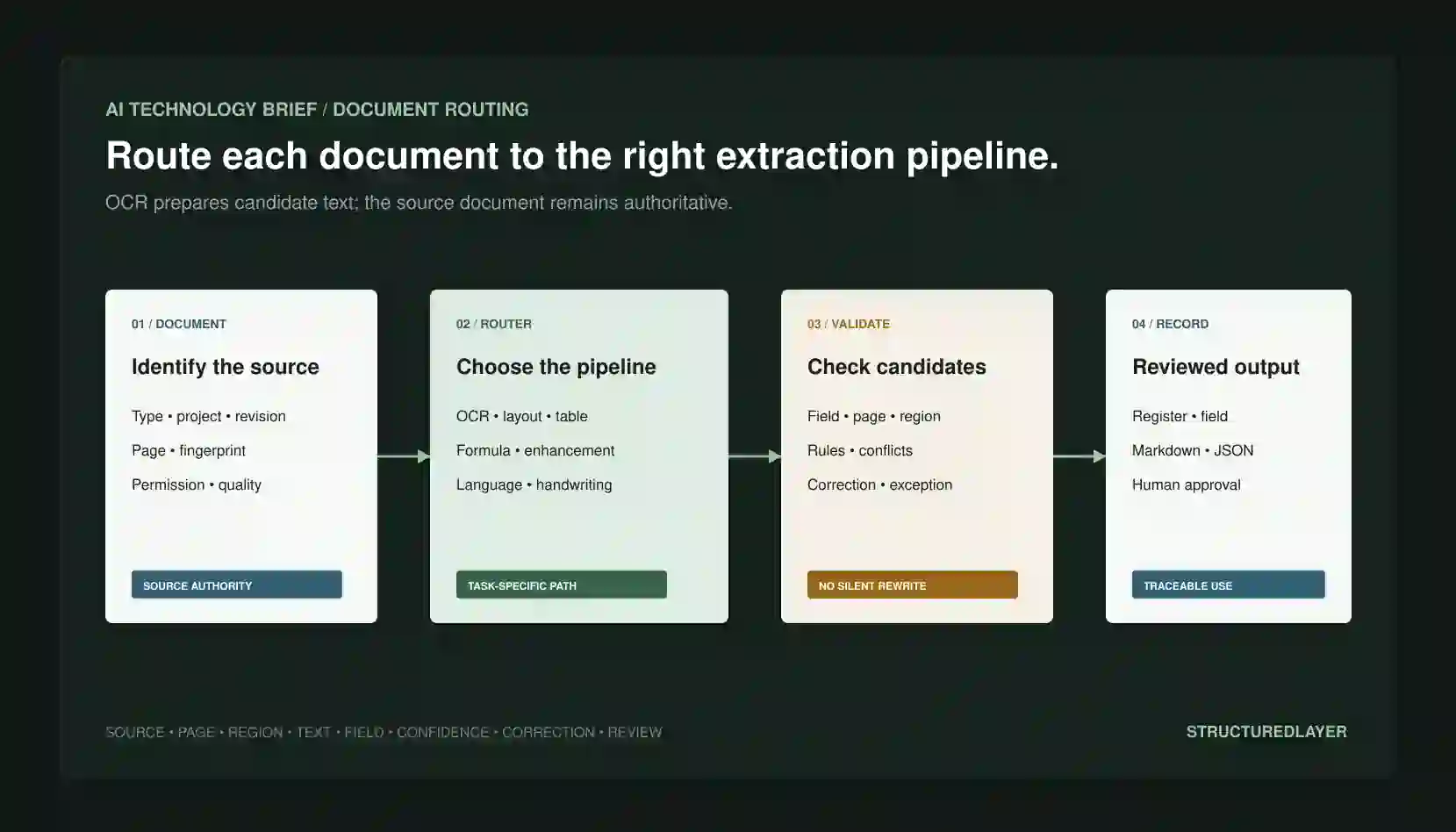
Use deterministic document classification to select a versioned extraction path.
The source file, revision, and page remain authoritative. Every normalized value links back to evidence.
Identify document
Project, document ID, revision, status, fingerprint, pages, language, type, permissions, and quality.
Route pipeline
Native text, OCR, enhancement, layout, table, formula, handwriting, specialist parser, or correction based on policy.
Candidate output
Raw text, reading order, elements, boxes, tables, formulas, Markdown, JSON, confidence, and warnings.
Reviewed record
Field validation, source link, correction diff, exception, reviewer, accepted value, and downstream record.
04 / Required records
Every extracted field needs page evidence and correction history.
Document
ID, project, title, type, revision, status, fingerprint, source, author, dates, permissions, and pages.
Page
Page number, image hash, dimensions, rotation, quality, language, native-text state, and preprocessing.
Run
Router decision, components, versions, settings, render resolution, prompts, duration, usage, and cost.
Element
Type, text, Markdown, JSON, box, reading order, table cells, formula, confidence, and page link.
Validation
Required, format, date, unit, arithmetic, controlled value, duplicate, cross-page, revision, and conflict checks.
Correction
Original OCR, proposed correction, diff, source region, reason, reviewer, accepted value, and audit.
05 / Construction example
Route construction documents according to layout and business consequence.
Examples are representative architecture patterns, not completed StructuredLayer deployments.
Drawing registers
Extract candidate numbers, titles, revisions, statuses, and dates with page regions; validate identity and revision relationships.
Quotes and invoices
Parse tables and fields, then verify arithmetic, currency, totals, project mapping, exclusions, and source pages.
Specifications and reports
Preserve headings, clauses, tables, page references, and reading order for controlled retrieval and review.
Equations and degraded scans
Route formulas to specialist OCR and poor pages through enhancement, preserving originals and every transformation.
06 / Deterministic controls
Do not let a correction model overwrite uncertain source text.
Native text first
Use embedded text where reliable before raster OCR; preserve both and detect disagreement.
Version and fingerprint
Identify the exact source, page render, preprocessing, model, settings, schema, and correction version.
Field-specific validation
Apply types, units, ranges, arithmetic, dictionaries, relationships, revisions, and cross-source checks.
Evidence-visible review
Show source page and region beside raw OCR, normalized value, confidence, warning, and correction diff.
Sensitive document control
Apply least privilege, purpose, encryption, region, retention, deletion, redaction, and incident response.
Human authority
Require approval for contract, price, payment, design, safety, compliance, employment, and external submission fields.
07 / Failure analysis
Clean Markdown or JSON can contain wrong text and wrong structure.
Character error
Names, numbers, decimal points, units, dates, symbols, and revisions may be misread.
Reading-order error
Columns, headers, footnotes, tables, callouts, and floating elements may be sequenced incorrectly.
Table reconstruction
Merged cells, repeated headers, units, subtotals, and page breaks can change row meaning.
Formula error
Symbols, superscripts, subscripts, fractions, and equation layout may be altered.
Correction hallucination
A language model can create fluent but unsupported text or normalize a value incorrectly.
Wrong document state
Perfect extraction from a superseded or unauthorized revision still creates the wrong business record.
08 / Deployment and cost
Choose hosted or private processing from sensitivity, volume, quality, and maintenance requirements.
Hosted parser
Confirm region, retention, training use, subprocessors, limits, price, lifecycle, security, and exit.
Private open pipeline
Manage OCR weights, layout models, rendering, GPU, dependencies, licences, monitoring, and updates.
Hybrid router
Keep native text and low-risk processing local; route only approved pages to specialist services.
Client-owned evidence
Preserve sources, runs, elements, validations, corrections, approvals, and accepted records independently.
- Document storage, page rendering, preprocessing, enhancement, transfer, retention, and deletion
- OCR, layout, tables, formulas, specialist parsing, correction, retries, and provider usage
- GPU, serving, dependencies, model weights, monitoring, patching, and scaling
- Schemas, field rules, ground truth, validation, exception queues, review, and correction
- Security, privacy, contracts, licensing, audit, incident response, backup, and recovery
- Integration with registers, records, retrieval, proposals, reporting, maintenance, and replacement
09 / Evaluation
Measure accepted fields and source links by document family.
- Character, word, line, field, table, formula, and reading-order accuracy
- Page, region, box, table-cell, and source-link completeness
- Accuracy by document type, language, scan, native text, rotation, layout, font, handwriting, and quality
- Wrong additions, omissions, normalized-value errors, and correction hallucinations
- Critical errors reaching price, contract, design, payment, safety, compliance, or submission records
- Reviewer correction time, exception rate, throughput, latency, and complete cost per accepted document
- Permission, retention, deletion, version change, failure, retry, recovery, and licensing evidence
- Regression after parser, model, preprocessing, render, schema, prompt, or source change
10 / Controlled pilot
Prove the operating boundary before expanding it.
Choose one document family
Use one recurring type and a small set of accepted fields.
Build ground truth
Include clean, degraded, multilingual, table, formula, superseded, and ambiguous examples.
Compare routes
Test native text, plain OCR, structured parser, specialist stage, and correction where justified.
Preserve evidence
Store original pages, regions, raw output, versions, validations, and correction diffs.
Keep writes reviewed
Do not update authoritative records or send documents automatically.
Set stop conditions
Stop for critical field errors, lost provenance, silent correction, privacy, licence, or excessive review failure.
11 / StructuredLayer recommendation
Route OCR by document family and accepted field, preserving the source page and every correction as evidence.
Begin with one document type, authoritative revision rules, representative ground truth, field-specific validation, page-region links, and human approval. Use enhancement, layout, table, formula, or correction stages only when their measured benefit exceeds added cost and failure risk.
12 / Primary sources
Capability, governance, and implementation claims remain inspectable.
Datalab
Marker repository
ByteDance
Dolphin repository
DeepSeek
DeepSeek-OCR repository
Datalab
Surya repository
Meta
Nougat repository
NAVER CLOVA
Donut repository
DocEnTR
DocEnTR paper
pix2tex
LaTeX-OCR
NIST
AI Risk Management Framework
Sources reviewed 22 July 2026. Technology capabilities, laws, guidance, terms, and pricing can change.