
Candidate coverage
Measure relevant detected or routed candidates and missed observations by class, project, source, camera, view, size, occlusion, lighting, weather, clutter, rotation, and quality.
AI Pilot Experience · Visual Evidence
Register approved site photos or video frames, group them by candidate object, zone, activity, or visual description, prepare source-linked observations, organize reviewer queues, retain corrections, and measure whether the result reduces inspection effort without inheriting business authority.
Pilot experience
Construction teams can collect thousands of site photos, video frames, aerial images, delivery images, and document views. The useful pilot question is not whether a model can draw a box. It is whether approved media can be organized into a reviewer-ready evidence queue while preserving source identity, purpose, rights, project context, limitations, and human authority.
The pilot starts with one low-consequence use such as routing site-log photos, locating candidate equipment or material stacks, grouping images by zone or activity, searching by visual description, or preparing boxes and masks for annotation. The workflow registers each source image, applies one task with a versioned class definition, and stores raw candidate outputs linked to the original frame and model run.
A reviewer sees the unmodified image alongside candidates, accepts or corrects labels, rejects false observations, records missing detections, and escalates anything outside scope. The pilot then measures review value and failure behavior across the agreed projects, cameras, views, lighting, weather, occlusion, clutter, rotation, and image-quality cases.
Visual walkthrough
Each view shows how source records, system outputs, exceptions, corrections, and human decisions remain connected during the pilot.
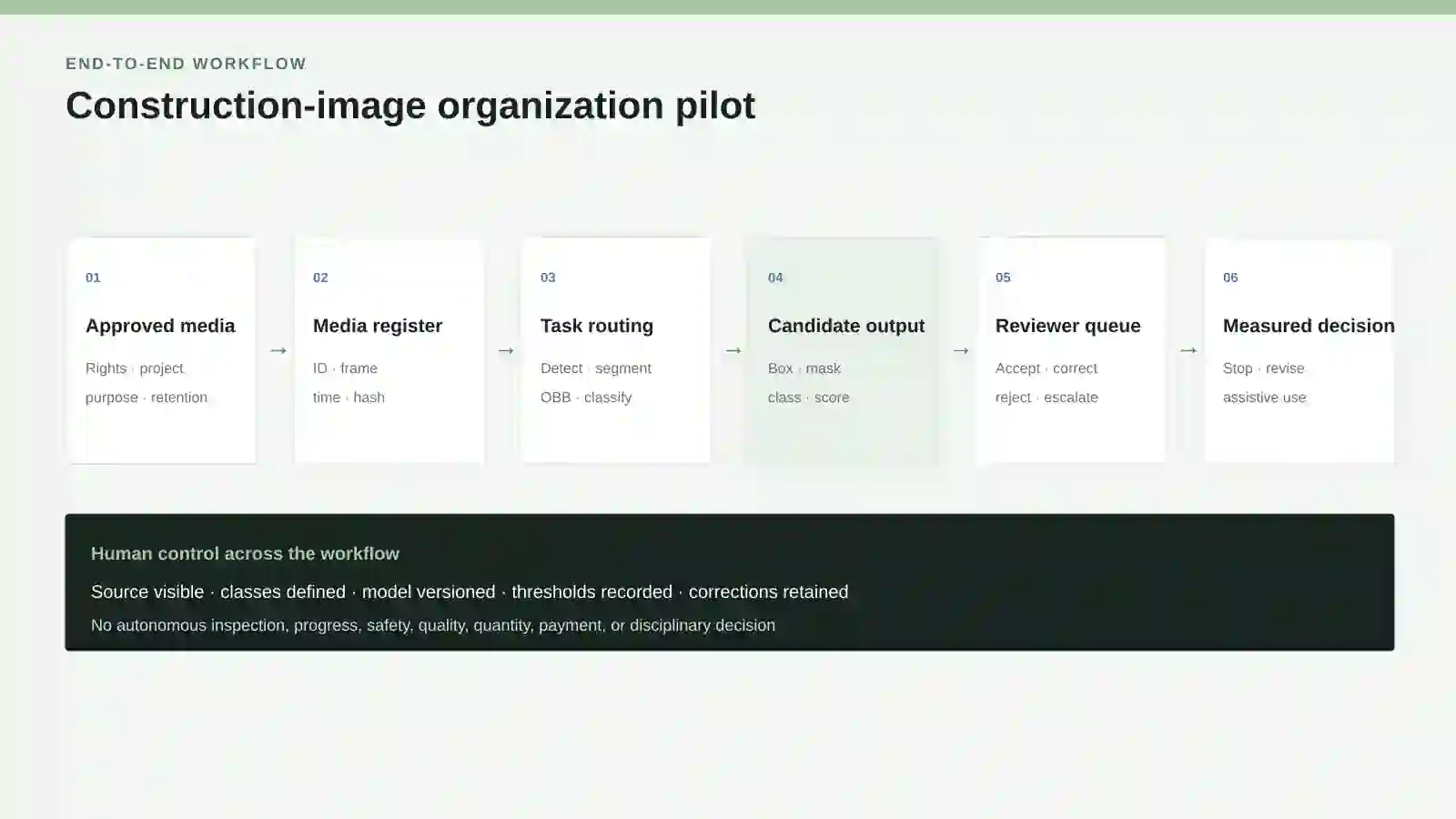
The pilot keeps human control across media intake, task selection, candidate outputs, corrections, and the final stop, revise, assistive-use, or production-scoping decision.
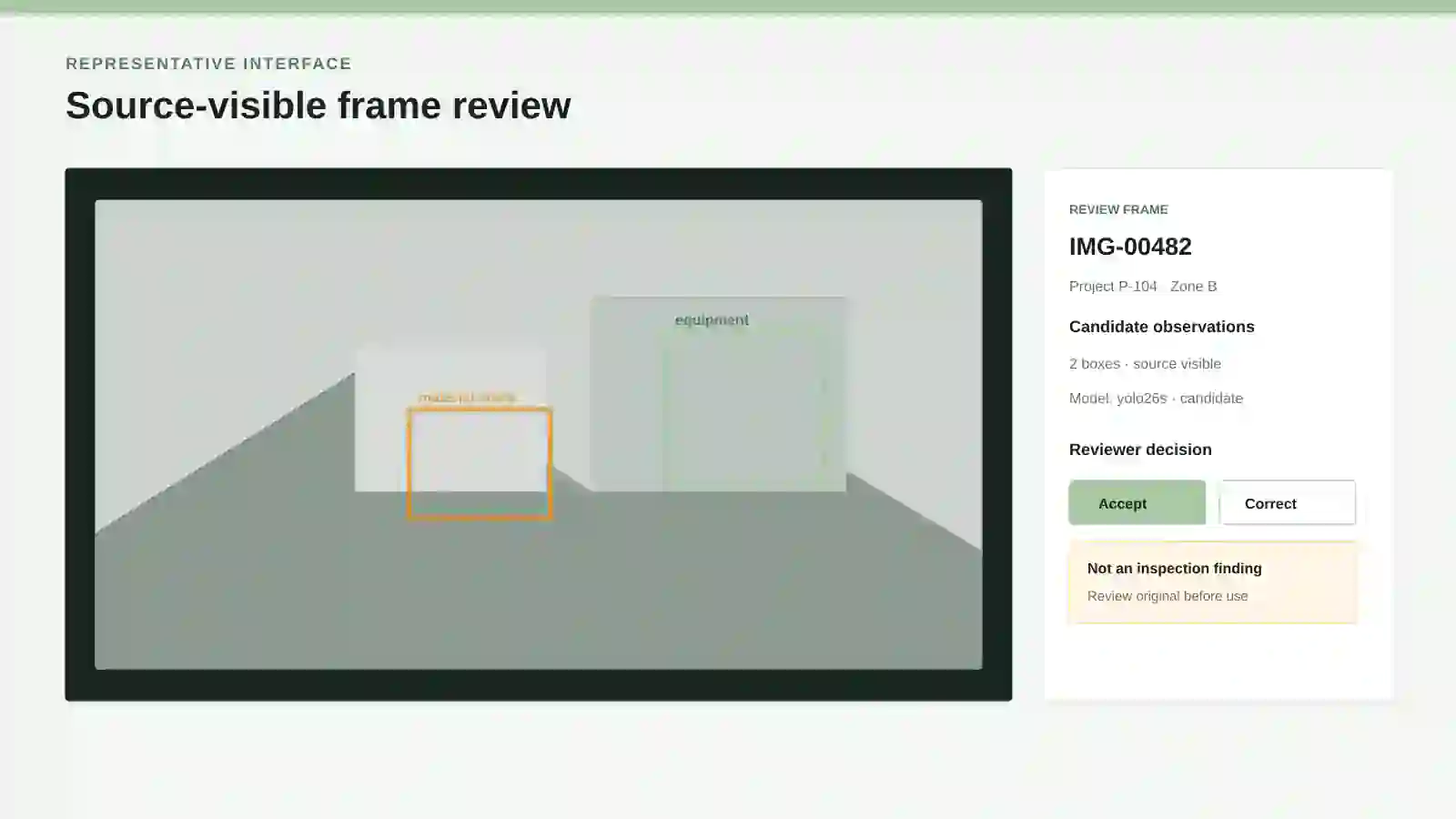
Reviewers inspect the original frame, candidate region, class, score, model version, and intended use. The interface does not present a candidate as an inspection finding.
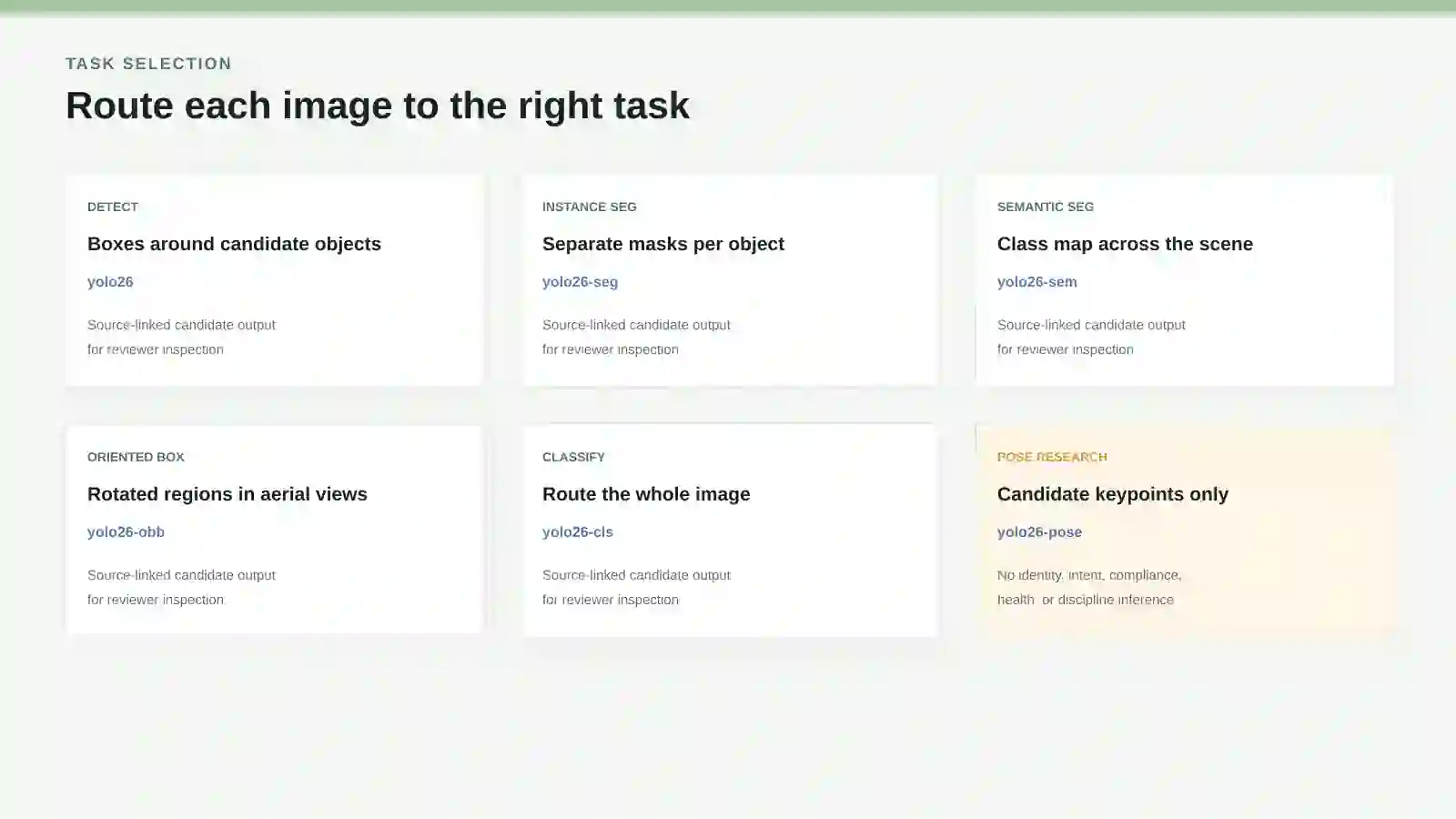
Boxes, instance masks, scene class maps, oriented regions, whole-image classes, and keypoints are different evidence objects with different ground truth and boundaries.
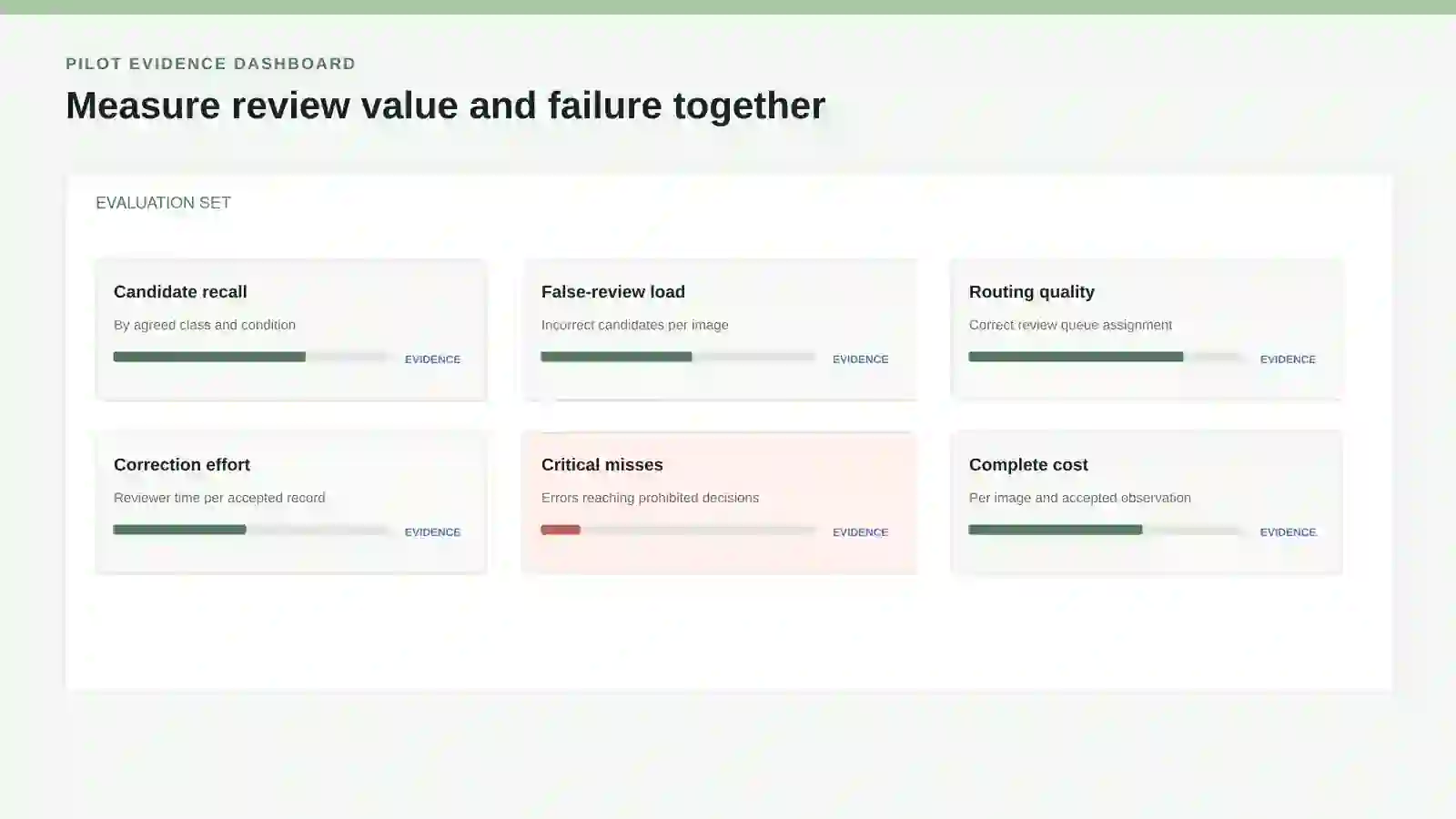
Track candidate coverage, false-review load, routing quality, correction effort, critical failures, and complete cost across the agreed evaluation set.
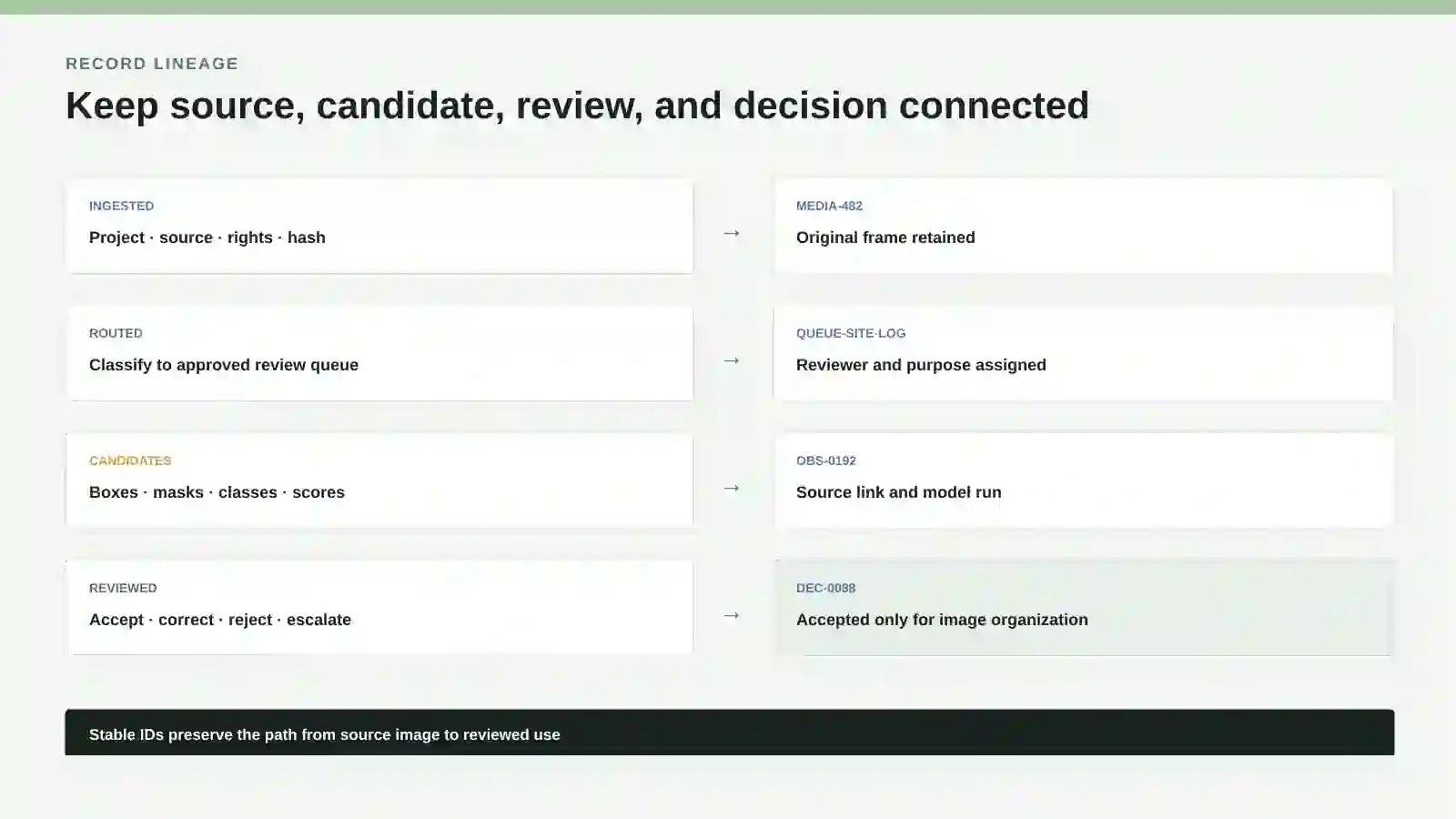
Stable media, queue, observation, run, review, and decision IDs preserve what the model prepared, what a person changed, and the narrow purpose accepted.
User journey
The interface can feel simple while the pilot preserves document identity, revision, permission, retrieval, uncertainty, and review evidence behind every result.
Choose one low-consequence image-organization purpose, approved projects and sources, intended users, prohibited inferences, retention, and accountable owner.
Store media ID, source-native ID, project, camera or uploader, timestamp, area where authorized, fingerprint, quality, rights, sensitivity, and original file.
Select whole-image class, box, oriented box, instance mask, semantic map, or narrowly bounded keypoints because it matches the reviewer task.
Version positive, negative, ambiguous, small, occluded, rotated, and visually similar examples plus checkpoint, scale, image size, thresholds, and regions.
Create source-linked candidates and warnings without overwriting the original image or releasing findings into project records.
Assign candidates by project, purpose, area, class, confidence band, exception, reviewer role, and due state while exposing possible misses.
A named reviewer opens the source, accepts or relabels candidates, records false alarms and misses, rejects prohibited use, and decides any downstream action separately.
Evaluate errors, correction effort, privacy, latency, cost, drift, licensing, and operational ownership before stopping, revising, retaining assistive use, or scoping production.
Technology options
The final selection records exact versions, licences, data handling, cost, limitations, replacement options, and the evidence required before use.
| Component | Examples | Pilot role | Boundary |
|---|---|---|---|
| Object detection | YOLO26 detection checkpoints or another evaluated detector | Prepare candidate classes and axis-aligned boxes around visible objects for reviewer organization. | COCO labels do not automatically represent construction equipment, materials, site conditions, PPE policy, defects, progress, quantities, or hazards. |
| Instance segmentation | YOLO26-seg or another evaluated instance segmenter | Prepare a separate pixel mask for each candidate object where a box is too coarse for the review task. | A mask is not a measured area, volume, quantity, completion percentage, or accepted condition without calibrated methods and review. |
| Semantic segmentation | YOLO26-sem or another evaluated scene parser | Assign candidate pixel classes across a scene for routing or annotation of broad visible regions. | Cityscapes-style labels and scene maps do not establish construction zoning, access compliance, progress, or safety state. |
| Oriented boxes | YOLO26-obb or another evaluated rotated detector | Prepare rotated candidate regions for aerial images, angled materials, equipment, or document imagery. | DOTAv1 transfer does not establish site-specific classes, scale, geolocation, ownership, quantity, condition, or survey-grade measurement. |
| Image classification | YOLO26-cls or another evaluated image classifier | Route a whole image into an approved category such as area, view type, capture quality, or reviewer queue. | ImageNet classes do not establish project-specific categories; one whole-image label can hide multiple activities, objects, and exceptions. |
| Pose research | YOLO26-pose or another evaluated keypoint model | Prepare candidate keypoints only for a narrowly defined, approved research or training-review question. | COCO-Pose keypoints do not establish identity, intent, fatigue, injury, competence, unsafe conduct, compliance, or disciplinary evidence. |
| Visual grounding and similarity | Grounding DINO, SigLIP 2, LocateAnything after verification, or another evaluated grounding and retrieval component | Group or retrieve approved frames by text description, semantic similarity, candidate box, or candidate point for reviewer inspection. | A similarity score, box, point, or returned frame does not verify presence, absence, identity, activity, condition, quantity, progress, defect, or safety state. |
| Deterministic controls | Media registry, permissions, policy rules, queues, validation, and stable IDs | Keep source, purpose, access, classes, runs, observations, reviews, accepted use, expiry, and withdrawal outside the model. | Controls depend on correct records, tested rules, named exception ownership, monitoring, security, and recovery. |
| Review interface | Client-owned web application, project-system extension, or controlled annotation queue | Show original frames, candidates, scores, definitions, corrections, possible misses, and downstream release state. | A click records the named review outcome only; it does not create inspection, professional, contractual, commercial, safety, or payment authority. |
Client-owned pilot outputs
Evaluation evidence
A fluent answer is not the acceptance unit. The pilot tests whether a reviewer can reach the controlling evidence efficiently and detect important failure.
Measure relevant detected or routed candidates and missed observations by class, project, source, camera, view, size, occlusion, lighting, weather, clutter, rotation, and quality.
Count incorrect classes, boxes, masks, keypoints, and queue assignments reaching reviewers at each threshold and confidence band.
Check box, oriented-box, mask, class, or keypoint output against accepted annotations for the exact use rather than a generic benchmark rank.
Measure time to inspect, accept, correct, reject, mark a miss, request recapture, and resolve exceptions, including disagreement between qualified reviewers.
Record any error, privacy breach, unsupported inference, or invisible model change that could reach inspection, safety, quality, progress, quantity, payment, or workforce decisions.
Measure capture, transfer, extraction, storage, labeling, inference, hardware, review, correction, monitoring, support, licensing, retention, deletion, and replacement per accepted observation.
Cost drivers
Scaling factors
Use durable identity, deduplication, frame sampling, queues, retries, checkpoints, storage tiers, retention, and deletion as capture grows.
Preserve client, joint-venture, project, location, source, user, purpose, retention, and record-level permissions for every media and review route.
Add a class only with an owner, construction-specific definition, agreed ground truth, thresholds, exceptions, reviewer role, and accepted downstream use.
Monitor new devices, viewpoints, seasons, weather, lighting, trades, materials, PPE, equipment, occlusion, and site-layout changes.
Measure edge, private, or managed processing against bandwidth, latency, GPU capacity, security, availability, support, and exit requirements.
A successful pilot still needs separate security, privacy, licence, integration, monitoring, recovery, service-level, training, ownership, and complete-cost approval.
Cross-industry reuse
The reusable capability is permission-aware multilingual retrieval across versioned documents with citations. Each industry keeps its own source authority, terminology, consequence, retention, and qualified review.
Site photos, video frames, aerial imagery, deliveries, equipment, material storage, progress records, and inspection-support media.
Review: Project, site, document-control, quality, safety, commercial, engineering, or other purpose-specific authority.
Asset photos, inspections, defects, condition surveys, work orders, inventories, handover media, and maintenance evidence.
Review: Property, facilities, survey, engineering, safety, compliance, insurance, or asset owner.
Equipment views, test imagery, laboratory media, installations, components, anomalies, drawings, and technical evidence.
Review: Qualified engineer, test owner, quality role, discipline lead, or authorized technical reviewer.
Site observations, design references, mockups, materials, finishes, samples, model imagery, and coordination views.
Review: Architect, design manager, technical lead, contract administrator, or relevant specialist.
Product images, components, line views, packaging, material handling, maintenance, and quality-support evidence.
Review: Production, quality, engineering, maintenance, logistics, or compliance owner.
Before-and-after photos, equipment, parts, damage, service visits, completion evidence, and access conditions.
Review: Service manager, technician, engineering, warranty, commercial, or safety owner.
Yard, vehicle, pallet, package, loading, damage, inventory, and proof-of-condition imagery.
Review: Warehouse, transport, inventory, claims, security, safety, or commercial owner.
Authorized property, asset, damage, repair, inspection, and claims-support imagery.
Review: Adjuster, surveyor, engineer, fraud, legal, privacy, or claims authority; model output is not coverage or liability determination.
Authority boundaries
Related paths
Continue into the operating, technical, security, and readiness guidance connected to this workflow.
Review the commercial scope, source boundary, evaluation approach, price range, duration, and possible decisions.
Open pageInspect exact YOLO task families, checkpoints, datasets, licensing, deployment, failures, and construction evidence boundaries.
Open pageUnderstand why anomaly scores and heatmaps prioritize review rather than establish a defect or accepted condition.
Open pageConnect approved field evidence to governed project, progress, change, cost, review, and decision records.
Open pageStart with one approved collection
Use general workflow information during the assessment. Do not submit confidential documents, passwords, API keys, authentication codes, or unrestricted system access.
Plain-language route guide
Choose the smallest route that answers your next decision.
The formal service names remain useful for scope and contracts. The plain-language labels explain what each route actually does. These are alternatives, not four mandatory stages.
Operating-Layer Blueprint
Buyer question answered
What should we build, and where should the boundary be?
Typical input
One priority workflow, a named owner, current systems, representative records or files, and known failure points.
Output
A client-owned current-state map, target design, source inventory, implementation boundary, timeline, and fixed quote.
Bounded AI Agent Pilot
Buyer question answered
Can one specific AI-assisted task work reliably enough to justify more?
Typical input
One named task, approved sources and tools, representative cases, a human reviewer, and explicit stop conditions.
Output
A working pilot, evaluation evidence, cost and failure findings, review requirements, and a proceed, revise, or stop recommendation.
Single Workflow Implementation
Buyer question answered
How do we put one recurring workflow into controlled production?
Typical input
A defined trigger and completion point, accountable owners, approximately three core systems, rules, approvals, and test cases.
Output
Connected records, an operating view, integrations, a dashboard, acceptance testing, training, documentation, and handover.
Complete Operating Layer Implementation
Buyer question answered
How do we connect shared data and decisions across teams?
Typical input
Two to five related workflows, shared records, several departments or systems, an executive sponsor, and named operating owners.
Output
A phased operating layer with shared records, permissions, interfaces, integrations, reporting, controlled automation, training, and handover.
Still unsure which route fits?
Describe one broken workflow. The free assessment may recommend a Blueprint, pilot, implementation, a smaller discovery step, or no engagement.