
AI Technology Brief
Where should Google Workspace AI fit in construction workflows?
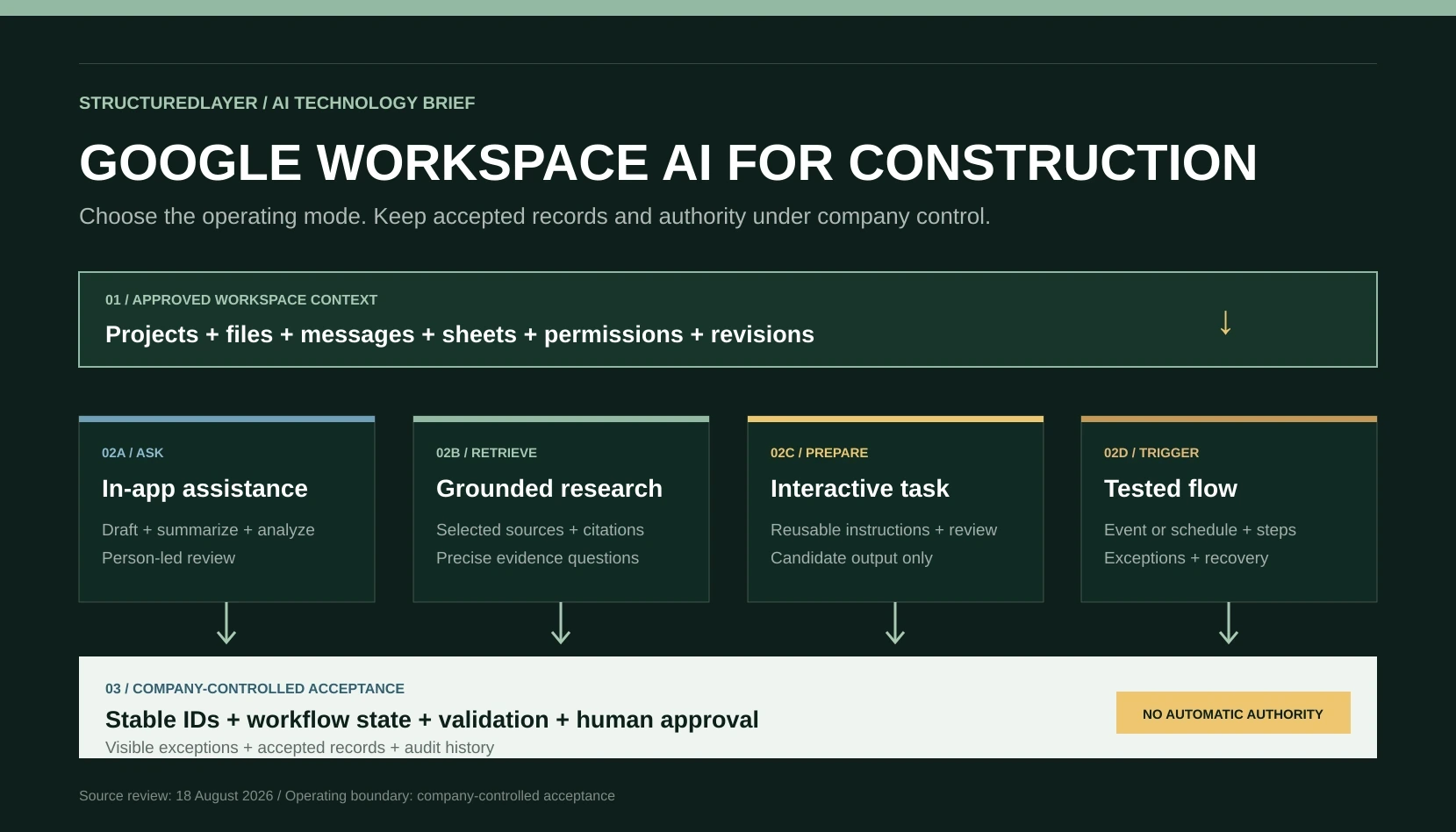
Gemini in Workspace, NotebookLM, Workspace Studio, and Spark provide different routes for asking, retrieving, preparing, and triggering work. Construction teams still need approved sources, stable records, permissions, exceptions, human acceptance, complete cost evidence, and a provider-independent operating boundary.
01 / Independently verifiable claims
Begin with what the technology and standards actually support.
- Google documents Gemini capabilities inside Gmail, Docs, Sheets, Slides, Drive, and Chat, including summarization, drafting, analysis, file retrieval, and action preparation. Availability varies by account, organization, language, geography, and feature.
- Gemini in Drive can summarize files and folders, answer questions across selected sources, analyze PDFs, create content, and organize files. Google warns that generated suggestions can be inaccurate or unsafe.
- Gemini in Sheets can create tables and formulas, analyze data, generate charts, use selected Drive files or Gmail messages as sources, and preview supported spreadsheet actions before a user applies them.
- Workspace Studio flows contain a starter, steps, and variables. A starter can be an event or schedule; Gemini can draft a flow from a natural-language description; the user can edit, test, and turn it on.
- Standard NotebookLM chat uses selected notebook sources and can provide inline citations that open the supporting passage. Google also documents experimental agentic chat for eligible subscribers, which has a different boundary.
- Supported Google Drive sources imported into NotebookLM can synchronize every few minutes, but comments and footnotes are not imported, inaccessible sources are excluded, and imported rendering can differ from the original.
- Google states that Workspace customer content is not used to train generative models outside Workspace without permission, while personal-account sharing and feedback routes can be governed by different terms.
- Gemini Spark provides a separate cloud-task route using tasks, schedules, skills, and connected apps under current account and regional eligibility requirements.
02 / The practical distinction
Ask, retrieve, prepare, trigger, and govern are different operating modes.
The lowest-friction Google feature is not automatically the right control boundary. Select the mode from the business outcome, source evidence, variability, and consequence.
In-app assistance
Ask and generate
Use Gemini inside Gmail, Docs, Sheets, Drive, or Chat for a person-led question, summary, draft, analysis, or previewed action.
Source-grounded research
Retrieve with citations
Use NotebookLM or selected Drive sources for precise questions where the reviewer needs inspectable supporting passages and source scope.
Interactive task
Prepare on demand
Use a reusable prompt, Gem, or eligible Spark skill when a person initiates preparation, reviews intermediate output, and refines the result.
Known trigger
Run a flow
Use Workspace Studio when an event or schedule can start defined steps with explicit variables, testing, ownership, and exception handling.
Business operation
Govern accepted state
Use a client-controlled operating layer when the process needs durable IDs, permissions, workflow state, validation, approval, audit, and portability.
03 / Operating architecture
Let Workspace provide approved context and bounded execution without becoming the source of truth.
The architecture should preserve company-owned records and acceptance even when Google provides the user interface, retrieval, generation, or flow execution.
Approved source layer
Identified projects, companies, documents, revisions, messages, forms, sheets, owners, permissions, and retention rules.
Context and retrieval layer
Selected Drive sources, folder scope, notebook sources, citations, source-access checks, freshness, and missing-evidence signals.
Preparation and flow layer
In-app prompts, reusable instructions, Studio starters and steps, Spark tasks, deterministic checks, budgets, and stop conditions.
Acceptance layer
Candidate outputs, reviewer corrections, exceptions, authorized decisions, accepted records, issue history, monitoring, and recovery.
04 / Required records
Every useful Workspace-assisted outcome still needs identity, evidence, ownership, and status.
Source record
System, file or message ID, project, revision, owner, permission, status, retrieval time, and authoritative purpose.
Task or flow definition
Purpose, starter, inputs, instructions, steps, variables, permitted actions, output schema, reviewer, and prohibited uses.
Execution run
Run ID, definition version, account, source set, start and end time, model or feature route, status, and complete usage.
Candidate output
Output ID, source links, assumptions, missing evidence, confidence limits, validation result, and proposed destination.
Review and decision
Named reviewer, corrections, accepted or rejected status, decision reason, authority, timestamp, and exact resulting action.
Exception and recovery
Skipped trigger, inaccessible source, stale context, unsupported file, failed step, partial side effect, owner, retry, and resolution.
05 / Construction example
A weekly project coordination pack shows where each mode belongs.
The objective is a source-linked candidate pack for review, not an autonomous project report or contractual record.
Sources
Identify approved updates
Limit context to the current project folder, approved correspondence, action register, meeting records, and reporting period.
Retrieval
Find evidence
Retrieve specific decisions, actions, dates, changes, and missing responses with links to the supporting file, message, or passage.
Preparation
Assemble the candidate pack
Generate a controlled draft with project IDs, reporting period, unresolved conflicts, missing evidence, and sections requiring owner input.
Authority
Review and accept
The project owner verifies status, programme, cost, commercial language, recipients, and issue authority before an accepted record or external communication.
06 / Deterministic controls
Control access, source selection, state changes, and acceptance outside conversational instructions.
Account and admin boundary
Confirm eligible account, organization support, admin settings, geography, language, terms, retention, and support before design.
Least-privilege sources
Restrict projects, folders, files, messages, fields, personal data, privileged material, and connected apps to the current purpose.
Source and revision identity
Carry stable IDs, current or superseded status, dates, owners, and citations into every candidate output.
Preview and validation
Use available action previews and deterministic checks for required fields, destinations, duplicates, values, and prohibited changes.
Named exception ownership
Assign skipped flows, stale sources, inaccessible files, incomplete output, partial actions, and recovery to a person with a deadline.
Separate business approval
Require authorized review for accepted registers, external issue, contracts, cost, schedule, payment, design, safety, legal, and compliance decisions.
07 / Failure analysis
Convenient integration can hide weak records, missing evidence, and unclear authority.
Chat output becomes the record
A generated summary is copied into operations without stable identity, source version, reviewer, correction history, or accepted status.
Folder access is mistaken for completeness
The model can access a folder, but required emails, external systems, superseded files, comments, or restricted records are missing.
Retrieval is asked to synthesize everything
A vague whole-project request returns a confident partial answer because relevant evidence was not selected or retrieved.
A flow runs without operational ownership
The trigger exists, but skipped runs, stale values, duplicate work, partial actions, and manual recovery are not monitored.
Native-format convenience drives uncontrolled migration
Files are converted or reorganized for AI access without checking formulas, formatting, document control, permissions, or authoritative status.
Model portability is assumed
A reusable instruction or skill is moved between tools without regression testing output structure, tool behavior, omissions, or failure handling.
Subscription price becomes the business case
Licensing is compared while preparation, migration, integration, review, corrections, failures, administration, support, and exit are omitted.
Workspace access becomes business authority
Technical ability to read, organize, draft, or change content is treated as permission to approve or issue a consequential outcome.
08 / Deployment and cost
Deploy by operating mode, consequence, and ownership rather than by product breadth.
In-app assisted work
Lowest setup for person-led drafting, summarization, analysis, and previewed actions. Requires user training, source discipline, and review.
Source-grounded notebook
Useful for bounded document and knowledge questions with citations. Requires source curation, permission review, sync checks, and retrieval evaluation.
Workspace Studio flow
Useful for a defined starter and repeatable steps across supported services. Requires testing, run ownership, exceptions, and recovery.
Spark or external operating layer
Useful when cloud tasks or broader orchestration are justified. Eligibility, identity, permissions, durable state, monitoring, provider dependency, and exit require explicit design.
- Workspace, Google AI, NotebookLM, Studio, Spark, storage, and connected-service licensing or usage
- Folder, file, message, spreadsheet, permissions, revision, and source-authority preparation
- Native-format conversion, data migration, integration, operating records, and deterministic validation
- Administrator setup, security review, legal and privacy review, training, support, and change management
- Human review, correction, exception handling, failed runs, duplicate work, partial-action recovery, and monitoring
- Complete cost per accepted outcome, plus replacement, export, and exit when products, models, limits, or terms change
09 / Evaluation
Measure evidence quality and accepted work, not how impressive the first answer appears.
- Source coverage: required files, messages, records, revisions, permissions, and reporting periods present
- Grounding: citation correctness, unsupported claims, wrong-source retrieval, conflicts, and missing-evidence disclosure
- Task quality: required fields, factual corrections, reviewer edits, prohibited conclusions, and accepted output rate
- Flow reliability: trigger accuracy, skipped and duplicate runs, step failures, partial effects, latency, and recovery
- Authority boundary: consequential changes and external issue blocked until the named reviewer authorizes the exact action
- Complete economics: licensing, usage, preparation, administration, review, correction, failure, support, and cost per accepted outcome
10 / Controlled pilot
Prove the operating boundary before expanding it.
Choose one accepted outcome
Use a weekly coordination pack, action follow-up draft, controlled document summary, or another low-consequence read-and-prepare task.
Classify the operating mode
Decide whether the task needs in-app assistance, cited retrieval, interactive preparation, a triggered flow, or a governed operating workflow.
Prepare approved sources
Identify stable records, current revisions, permissions, missing inputs, excluded material, reporting period, and authoritative destinations.
Build the smallest route
Configure only the required Workspace feature, notebook, flow, or task with explicit instructions, schema, checks, limits, and stop conditions.
Test difficult cases
Include stale and inaccessible files, conflicting revisions, unsupported formats, missing emails, trigger failures, duplicates, and unsafe requested actions.
Decide from accepted outcomes
Measure quality, review effort, exceptions, reliability, complete cost, administration, portability, and the evidence for expansion or rejection.
Buyer classification test
Classify what the system controls before accepting the label.
- 01
Does a person remain in the app and ask for a draft, summary, analysis, or previewed change? Start with in-app assistance.
- 02
Does the reviewer need a precise answer with inspectable supporting passages? Use a source-grounded retrieval route and test citation quality.
- 03
Does a person need to initiate, inspect, and refine a repeatable task? Use interactive preparation with reusable instructions.
- 04
Is there a reliable event or schedule and a substantially known sequence of steps? Consider a tested flow with exception ownership.
- 05
Does the process require durable state, cross-system controls, approvals, accepted records, audit, and recovery? Use an operating layer outside the chat.
- 06
Can the business still identify the source, reviewer, accepted outcome, complete cost, and exit path if the Google feature changes? If not, the design is incomplete.
11 / StructuredLayer recommendation
Use Google Workspace AI to reduce friction around approved work, not to replace the records and authority that make the work trustworthy.
Begin with one low-consequence, read-and-prepare workflow. Match the task to the correct mode: in-app assistance, cited retrieval, interactive preparation, or a tested flow. Keep stable business records, permissions, workflow state, exceptions, approval, accepted outputs, monitoring, and portability under company control. Compare complete cost per accepted outcome before expanding.
12 / Primary sources
Capability, governance, and implementation claims remain inspectable.
Google Workspace Learning Center
Using Google Workspace with Gemini
Google Drive Help
Get started with Gemini in Google Drive
Google Docs Editors Help
Collaborate with Gemini in Google Sheets
Google Workspace Learning Center
Create your first flow in Google Workspace Studio
Google Workspace Studio Help
Get started with Google Workspace Studio
Google NotebookLM Help
Use chat in NotebookLM
Google NotebookLM Help
Add or discover new sources for your notebook
Google Docs Editors Help
How Gemini in Workspace protects your data
Google Gemini Apps Help
Use Gemini Spark to manage tasks and workflows
Sources reviewed 18 August 2026. Technology capabilities, laws, guidance, terms, and pricing can change.
13 / Related StructuredLayer guidance
Continue from model selection into operating architecture.
Gemini Spark for Construction Workflows
Inspect the narrower cloud-task route through schedules, skills, connected apps, monitoring, and human authorization.
Generative AI vs Automation vs AI Agents
Distinguish candidate content, deterministic actions, governed workflows, bounded agents, and agentic systems.
Why AI Gives Different Answers From the Same Files
Evaluate source selection, permissions, parsing, retrieval, prompts, models, and run evidence behind changing answers.