The project information exists, but only behind a browser
A preconstruction team monitors several construction opportunity portals.
Every morning, someone must:
- Sign in
- Apply saved filters
- Wait for results to load
- Identify new or changed listings
- Open each opportunity
- Capture the project details
- Download permitted documents
- Check addenda and deadlines
- Copy information into a spreadsheet or CRM
- Notify the appropriate estimator
Some portals provide APIs or exports. Others expose only a browser interface. Even where an API exists, it may not contain every field, document, relationship, or update visible to an authorized user.
At StructuredLayer, we use the safest suitable connection method available. We prefer approved APIs, webhooks, and exports where they meet the requirement. A controlled browser workflow becomes relevant when the necessary authorized information remains available only through the interface.
This article describes a representative operating pattern. It does not authorize access to any specific platform, bypass subscription controls, override platform terms, or permit collection of information outside the client’s rights.
The connection hierarchy
We consider connection methods in this order:
01. Native API
Use an approved API when it provides the required records, fields, documents, updates, and permissions reliably.
02. Webhook or event notification
Use platform events when the system can notify the workflow about a new or changed record.
03. Scheduled export
Use CSV, spreadsheet, report, email, or document exports when they preserve the required information.
04. Controlled mailbox ingestion
Use authorized inbox rules when portals deliver opportunity notices, addenda, documents, or status changes by email.
05. Authorized browser workflow
Use bounded browser interaction when the required task can only be performed through the user interface and the client has confirmed its authority to do so.
Browser automation should not be the automatic first choice. It carries additional monitoring, security, interface-change, and failure-recovery requirements.
The StructuredLayer three-layer model
Layer 01: The Data Layer
The browser is a source. It should not become the database.
We create controlled records outside the portal so the business can identify what was captured, when it changed, where it came from, and what happened next.
A portal-source record may contain:
| Field | Purpose |
|---|---|
| Portal source ID | Stable identifier for the source platform |
| Authorized account ID | Account used for permitted access |
| Listing ID | Portal’s opportunity identifier |
| Internal project ID | Connected business project identifier |
| Source URL | Direct evidence link |
| First-seen date | When the workflow first discovered the listing |
| Last-checked date | Most recent successful review |
| Source-updated date | Portal’s reported update timestamp |
| Content fingerprint | Supports change and duplicate detection |
| Capture status | New, changed, unchanged, incomplete, or failed |
| Document IDs | Connected downloaded documents |
| Deadline | Current response or bid deadline |
| Addendum status | Known addendum count and review status |
| Authority status | Whether the source is permitted for this use |
| Review owner | Person responsible for exceptions |
The internal record should preserve the portal listing ID and source URL. A similar project title alone is not a reliable match.
Layer 02: The Workflow Layer
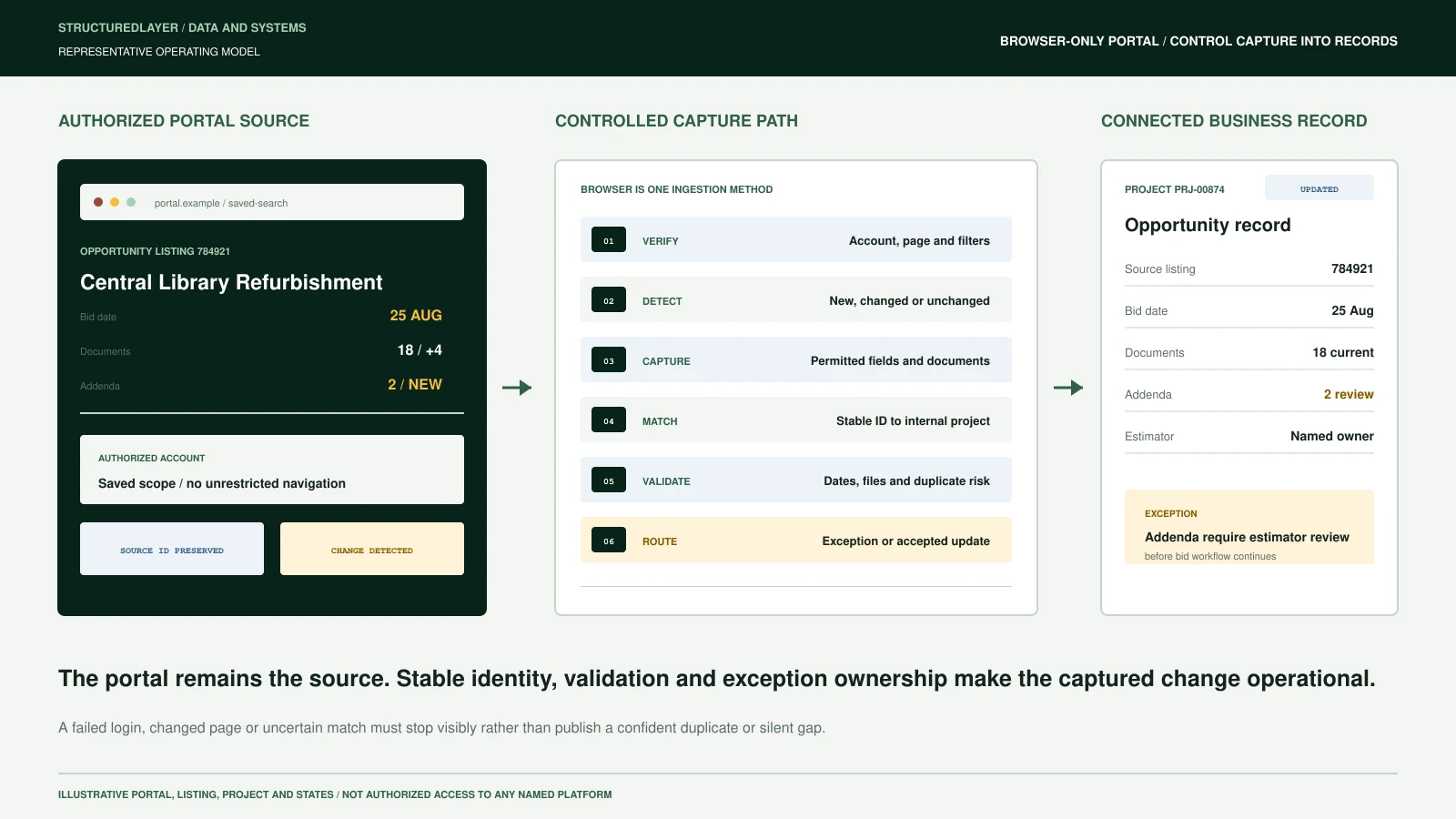
A controlled browser workflow can move through the following stages:
01. Schedule
Start at an approved frequency or through a controlled manual request.
02. Authenticate
Use an approved account, permitted session, least-privilege access, and protected credential handling.
03. Navigate
Open the approved page and apply the agreed filters, geography, trades, dates, project types, or saved searches.
04. Wait and verify
Confirm that the expected page, filters, results, account identity, and loading state are present before extracting information.
05. Detect
Identify new, changed, reopened, duplicated, removed, or unchanged listings.
06. Capture
Collect approved fields, source references, dates, documents, notices, and relationships.
07. Match
Connect the listing to an existing project or create a controlled candidate record.
08. Validate
Check required fields, document completeness, dates, duplicate risk, source consistency, and extraction confidence.
09. Route
Send uncertain matches, missing information, failed downloads, changed layouts, authentication problems, and material updates to review queues.
10. Publish
Only validated records move into the operational register, dashboard, CRM, estimating queue, or downstream workflow.
11. Monitor
Record each run, successful and failed actions, processing time, changes found, exceptions, and recovery attempts.
The workflow should never silently mark a failed run as successful.
Layer 03: AI and Automation Layer
Deterministic automation can handle predictable work:
- Opening a known page
- Applying stable filters
- Waiting for defined page conditions
- Reading structured page fields
- Downloading approved files
- Comparing identifiers
- Calculating fingerprints
- Checking required fields
- Updating known records
- Triggering scheduled notifications
AI or computer-use capabilities may assist when:
- Labels or layouts vary
- Information appears in several visual regions
- A project requires classification
- Two records may refer to the same opportunity
- Documents require interpretation
- An unfamiliar page state must be diagnosed
- A natural-language summary is useful
- The workflow must explain why it stopped
AI should not be allowed to improvise unrestricted navigation, bypass access controls, accept contractual terms, submit bids, send external commitments, or overwrite authoritative records without defined authority.
Computer-use models can interact with interfaces designed for humans, but current systems still make mistakes and require safeguards, confirmations, monitoring, and appropriate human oversight. OpenAI’s computer-use overview describes both the capability and its limitations.
Business Outcomes
Business outcomes sit above the operating model. They are the usable and measurable results produced by structured records, controlled workflows, bounded automation, and accountable human review.
The result should be a controlled operational record, not a folder of screenshots.
A validated output may include:
Opportunity record
- Internal project ID
- Portal listing ID
- Project name
- Client or issuing organization
- Location
- Project type
- Trade or package
- Estimated value where provided
- Published date
- Bid date
- Question deadline
- Current status
- Source URL
- Responsible estimator
- Bid/no-bid status
Document register
- Document ID
- Filename
- Document type
- Portal source
- Download date
- Source version
- Addendum relationship
- Content fingerprint
- Review status
- Controlled storage link
Exception record
- Failed step
- Detected problem
- Affected listing
- Attempt history
- Evidence available
- Responsible owner
- Escalation status
- Required human action
These records can support dashboards, estimator assignments, addendum control, document reviews, reporting, and later AI-assisted workflows.
A practical example
Assume the portal originally contains:
Listing ID: 784921
Project: Central Library Refurbishment
Bid date: 18 August
Documents: 14
Addenda: 0
Three days later, the project title remains the same, but:
Bid date: 25 August
Documents: 18
Addenda: 2
A weak automation may create a second opportunity because the dates and document count changed.
A controlled workflow uses the stable listing ID to update the existing record, creates two addendum records, links the four new files, preserves the previous deadline, and routes the changes to the responsible estimator.
The goal is not merely to notice that the page changed. The goal is to connect the change to the correct business record and accountable person.
Authentication and session security
Authenticated browser state can contain cookies and headers capable of impersonating the user. Playwright’s official authentication guidance warns that stored browser state may contain sensitive information and should not be committed to a repository.
We therefore define controls such as:
- Client-authorized accounts
- Dedicated automation identities where supported
- Least-privilege permissions
- Protected secret storage
- Multifactor-authentication procedures
- Session-expiry handling
- Restricted runtime environments
- Controlled logs
- No passwords in databases, screenshots, or source code
- Access revocation procedures
- Audit records
- Documented account ownership
Console output, network traces, page content, and downloaded files may also contain sensitive information. Logging should be minimized, access-controlled, and redacted where required.
What happens when the page changes?
“Self-healing” should not mean uncontrolled improvisation.
We use a recovery ladder:
- Retry the current action within an agreed limit.
- Refresh the page and verify the authenticated state.
- Return to a known checkpoint.
- Relocate the element using stable user-facing attributes.
- Validate the page title, headings, labels, and expected record count.
- Compare the observed state with approved alternative layouts.
- Use bounded AI assistance to classify an unfamiliar state where permitted.
- stop and create an exception when confidence remains below the accepted threshold.
- Notify the responsible person through the approved channel.
- Preserve enough technical evidence to diagnose the failure without unnecessarily exposing project information.
Modern browser frameworks support auto-waiting, retryable checks, and resilient user-facing locators. They do not remove the need for monitoring and exception handling.
Common failure modes
A production design should anticipate:
- Expired sessions
- Multifactor-authentication requests
- CAPTCHA challenges
- Portal maintenance
- Changed filters
- Renamed buttons
- Changed result layouts
- Delayed JavaScript loading
- Pop-ups or announcements
- Failed document downloads
- Duplicate listings
- Reopened opportunities
- Missing listing identifiers
- Conflicting deadlines
- Access restrictions
- Subscription changes
- Unexpected terms or consent screens
- Rate limits
- Temporary network failure
- Changes to platform terms
The correct response may be retry, fallback, review, or complete stop. It should never be an invisible guess.
Human Control across every layer
Human Control operates across every layer. People define authoritative sources, approve sensitive actions, resolve exceptions, validate outputs, and remain accountable for professional and commercial decisions.
Human-approval boundaries
A person should normally remain responsible for:
- Confirming the authorized access method
- Completing unexpected authentication challenges
- Accepting new terms or permissions
- Resolving uncertain project matches
- Approving bid/no-bid decisions
- Assigning accountable estimators
- Interpreting contractual requirements
- Confirming material addenda
- Approving external communication
- Submitting a bid
- Responding to portal restrictions
- Authorizing workflow changes after the interface changes
Minimum acceptance test
Before production use, the workflow should demonstrate that it can:
- Access only the approved portal and account scope.
- confirm the expected account, filters, and results page.
- identify a listing using a stable source identifier.
- distinguish new, changed, unchanged, and duplicate records.
- connect updates to the correct internal project.
- download only permitted documents.
- preserve source URLs, timestamps, versions, and fingerprints.
- detect changed deadlines and addenda.
- route incomplete or uncertain records for human review.
- stop safely when authentication, access, or page state is uncertain.
- notify an accountable person after an unrecoverable failure.
- maintain a reviewable run history.
- resume from an approved checkpoint without duplicating data.
- support an immediate disable and manual fallback procedure.
Practical recommendation
Start with:
- One portal
- One approved account
- One saved search
- One opportunity type
- A limited historical sample
- A defined field list
- One internal project register
- One exception owner
- One notification channel
- One acceptance plan
Measure:
- Successful run rate
- Correct listing identification
- Duplicate rate
- Field accuracy
- Document-download success
- Change-detection accuracy
- Exception volume
- Human correction rate
- Cost per accepted record
- Time per completed run
At StructuredLayer, our preferred pattern is:
Authorized source → controlled capture → connected record → validation → exception handling → accountable business action
Browser automation is not the operating layer. It is one controlled ingestion method feeding the operating layer.
Sources and further reading
- OpenAI: Computer-Using Agent
- OpenAI Operator System Card
- Playwright Authentication Guidance
- Playwright Locators and Retryability
- Playwright Auto-Waiting
- OWASP Securing Agentic Applications Guide
Related StructuredLayer resources
- Bid Portal Ingestion Workflow
- Controlled RFQ-to-Bid Workflow
- How to Build an Operating Layer Without Replacing Every Tool
Assess one browser-based workflow
Tell us which portal your team uses, how access is authorized, what people collect, what changes must be detected, where the records should go, and which actions require human approval.