Unreal Engine provides an environment, not professional authority
An Unreal Engine scene can be immersive, interactive, editable, and connected to project information. AI can help prepare geometry, scripts, metadata, alternatives, and interfaces. Procedural tools can create parcels, extrude footprints, subdivide floors, apply setbacks, assign phases, and generate review views.
These capabilities are useful. They do not automatically establish that the result is:
- An approved architectural or engineering design
- A coordinated BIM deliverable
- A code-compliant planning solution
- A validated construction sequence
- An approved site logistics or safety plan
- A calibrated performance simulation
- An operational digital twin
- An authenticated project record
The buyer needs to know which class of output has actually been produced, what sources and parameters support it, how it was checked, who reviewed it, and what purpose has been approved.
This article describes a representative controlled workflow. It does not present a completed client deployment, validated engineering method, approved safety procedure, measured project outcome, or guarantee that Unreal Engine is suitable for a specific organization.
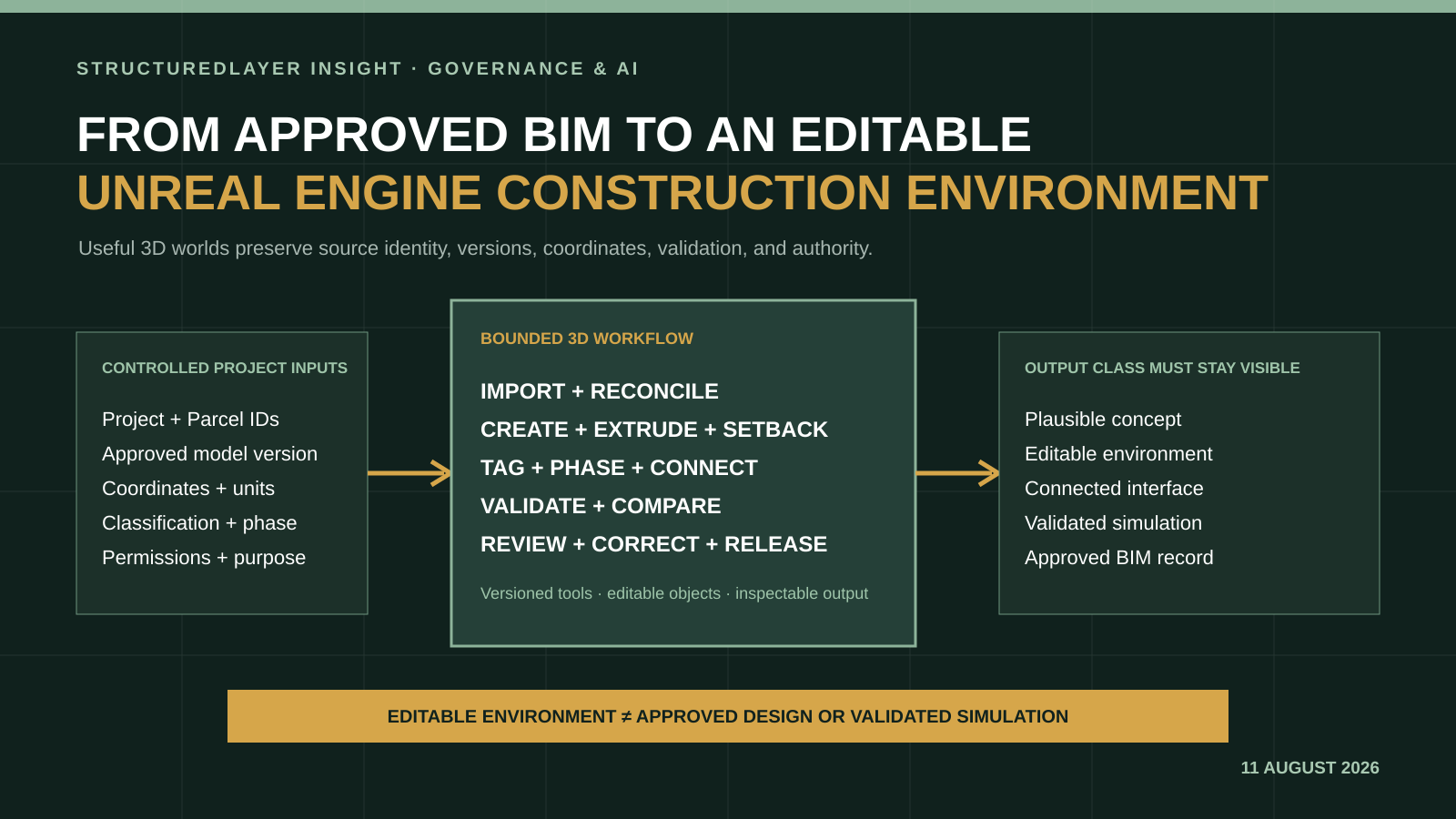
Five output classes that should not be confused
1. Plausible concept
A massing option, layout, material treatment, landscape, environment, or construction scene may be visually plausible and useful for early discussion. Hidden geometry, scale, dimensions, relationships, physical behavior, and technical assumptions may be inferred or simplified.
A plausible concept is appropriate where visual communication is the purpose and unverified content remains clearly labeled.
2. Editable 3D environment
An editable environment contains structured objects, transforms, metadata, materials, cameras, interactions, scripts, states, and versions that can be inspected and changed. Editability is valuable because a reviewer can identify a specific element, inspect its parameters, correct it, and regenerate a controlled result.
Editability does not establish design validity. The object may still use the wrong source version, coordinates, units, classification, dimensions, or rule.
3. Connected interface
A connected interface presents identified project or asset records, telemetry, schedules, work orders, documents, alarms, or performance measures inside the 3D environment.
Connection introduces additional questions: identity, update frequency, timestamp, data quality, latency, permissions, offline behavior, stale state, conflict, alert ownership, write authority, and recovery. A connection does not automatically create a digital twin.
4. Validated simulation
A simulation uses a purpose-specific analytical model with documented equations, assumptions, boundary conditions, calibration, verification, validation, uncertainty, and qualified interpretation.
An animated construction sequence is not automatically a schedule simulation. A visible airflow, evacuation, equipment movement, energy value, or crowd route is not automatically a validated analysis because it moves convincingly on screen.
5. Approved BIM or project record
An approved model or project record is developed and exchanged under adopted project requirements, coordinate systems, information standards, responsibilities, status codes, revision controls, reviews, and professional authority.
A model imported into Unreal Engine does not transfer its approval to every generated object, material, interaction, connection, or downstream export. The imported source and generated environment need separate version and acceptance records.
Begin with trusted project inputs
A controlled 3D workflow starts by identifying the permitted project context.
Stable identities
Use stable company, project, parcel, building, level, zone, space, system, asset, document, model, element, schedule activity, package, work item, run, review, and accepted-output IDs. Preserve native IDs from BIM, GIS, document, asset, project, and operational systems through crosswalks.
Names, filenames, object labels, and hierarchy positions can change. They should not become the only durable relationship.
Model and document versions
Record the model or document ID, native ID, discipline, author, revision, status, issue date, effective period, superseded version, permission, intended use, and controlling source link.
IFC, RVT, NWD, CAD, point cloud, GIS, mesh, drawing, specification, schedule, photograph, or register presence does not establish approval. Keep approved, shared, work-in-progress, reference, historical, inferred, and generated states separate.
Coordinates, units, and scale
Preserve coordinate reference system, origin, orientation, units, elevation basis, survey control, site boundary, known dimensions, georeferencing transforms, and accuracy. A visually aligned scene can still be dimensionally or geographically wrong.
Classification and relationships
Preserve object class, property sets, discipline, level, zone, package, phase, status, source element, parent system, responsibility, and relationship to schedule, cost, document, issue, or asset records.
Purpose and permissions
Define why the environment exists, who can access it, which projects and records may be used, whether live data is permitted, what can be prepared or changed, and who can release the result.
The operating path
Data Layer: normalize without erasing the source
The Data Layer reconciles identities, coordinates, units, classifications, versions, and relationships. It keeps authoritative source files unchanged, records every import and transformation, and labels observed, measured, approved, inferred, generated, and accepted information.
Workflow Layer: define the bounded purpose
The Workflow Layer specifies the use case, required inputs, tool permissions, parameter limits, task states, assignments, validation, exceptions, review, correction, approval, release, expiry, and recovery.
A master-planning option, logistics review, phasing communication, digital-twin interface, and safety rehearsal are different workflows. They should not share one vague acceptance test.
AI and Automation Layer: prepare inspectable operations
AI can interpret an approved brief, classify source material, propose parameter values, write bounded scripts, map objects, prepare alternatives, explain differences, and route exceptions.
Deterministic tools should execute and validate exact spatial operations where practical. A narrow tool surface might include:
- Import identified model version
- Create parcel from approved boundary
- Extrude identified footprint
- Set height or floor-to-floor value within approved limits
- Apply documented setback rule
- Subdivide floors or zones
- Place approved object from a controlled library
- Attach stable IDs and metadata
- Assign phase or status
- Compare two identified versions
- Validate units, coordinates, hierarchy, references, and required fields
- Render fixed review views
- Export a controlled review package
The model proposes or prepares. The engine and validators perform defined operations. Accountable people review and accept the result for a stated purpose.
Candidate buyer uses
Early master planning and layout options
Teams may use parcels, footprints, maximum heights, floor-to-floor assumptions, programme, setbacks, circulation, orientation, and site relationships to explore candidate schemes.
The environment can accelerate option preparation and make assumptions visible. Planning compliance, design quality, area calculations, daylight, structure, fire, access, cost, and other conclusions remain subject to their governing methods and professional review.
Construction logistics and phasing visualization
An editable scene can communicate access routes, cranes, hoists, laydown, deliveries, temporary works zones, work fronts, sequence, status, and spatial constraints.
A visual sequence does not prove constructability, schedule logic, capacity, temporary works adequacy, lifting safety, traffic management, or method approval. Connect the environment to identified schedule activities, model elements, locations, packages, dates, statuses, and source versions, then require relevant VDC, engineering, planning, logistics, and site review.
Digital-twin interface prototype
A team may prototype how asset records, building systems, energy, water, environmental data, alarms, work orders, and maintenance information appear in 3D.
Use synthetic or historical data first. Before connecting live systems, define asset IDs, telemetry source, timestamp, unit, quality, latency, permissions, alarm logic, write boundary, failure state, cybersecurity, operational ownership, and manual fallback.
Site-access and safety rehearsal
A controlled scene can support discussion of routes, isolations, interfaces, visibility, exclusion zones, staging, and generic scenarios. It can help reviewers identify questions before site work.
It must not be presented as an approved method, risk assessment, emergency plan, training certification, or verified site condition unless the required competent people, evidence, procedures, validation, and approvals support that use.
The human review loop
Human Control applies across the workflow, not only at the final screen.
Architects may review spatial intent, design status, and planning assumptions. Engineers may review technical relationships, loads, interfaces, temporary works, or analytical boundaries. VDC and BIM specialists may review model identity, coordinates, classification, exchange, scene structure, and version reconciliation. Planners may review activity logic and data dates. Safety roles may review hazards, procedures, access, and communication. Facility managers may review asset identity, telemetry, alarms, maintenance, and operational response. Project owners may approve purpose, value, release, and business use.
The appropriate reviewers depend on the output and consequence. One reviewer does not inherit every professional or organizational authority.
The review record should preserve:
- Source IDs and versions
- Parameters and procedural rules
- Tool, script, plugin, engine, and model versions
- Generated or transformed elements
- Deterministic validation results
- Known omissions and conflicts
- Reviewer comments and corrections
- Approved purpose and prohibited uses
- Release version, expiry, withdrawal, and supersession
A narrow pilot is the practical first step
Do not begin with an autonomous virtual construction department or a complete live digital twin. Choose one bounded visualization or interaction problem.
A strong pilot includes:
- One approved purpose and output class
- One project or representative controlled dataset
- Identified source models, records, versions, coordinates, and permissions
- A narrow procedural tool surface
- Explicit assumptions, tolerances, and prohibited conclusions
- Representative normal, incomplete, conflicting, stale, misaligned, and invalid cases
- Deterministic structural and metadata checks
- Fixed review views and inspectable object state
- Relevant professional and business reviewers
- Measures for accepted quality, correction effort, latency, cost, exceptions, and reproducibility
- Stop conditions for invalid geometry, broken identity, failed imports, missing provenance, unsafe depiction, excessive correction, or authority confusion
- Client-owned files, scripts, configuration, tests, documentation, training, and handover
A useful outcome may be a reviewed massing tool, a logistics option viewer, a phasing communication environment, or a digital-twin interface prototype. It does not need to become an approved design or production system to produce a valuable decision.
Buyer questions before implementation
- What precise decision or communication should the environment support?
- Which output class is required?
- Which model and record versions are authoritative for that purpose?
- How will stable IDs survive import, transformation, and export?
- Which coordinates, units, tolerances, and classifications apply?
- Which operations should be deterministic, procedural, AI-assisted, or manual?
- Which results are visually reviewed and which require analytical validation?
- Who can read, edit, review, approve, publish, or connect live data?
- What happens when a source is stale, missing, conflicting, misaligned, or inaccessible?
- How are generated elements labeled and prevented from contaminating approved records?
- What does the client own, and how can the environment be maintained or replaced?
The buyer conclusion
Unreal Engine can be a valuable presentation and interaction environment. Controlled AI and procedural tools can accelerate preparation and make alternatives easier to explore. The dependable value comes from preserving the operating context around the scene:
Trusted records → bounded procedural operations → editable environment → purpose-specific validation → professional review → approved use
Keep the output class visible. A realistic, editable, or connected environment should never silently become design authority, simulation evidence, safety approval, or project truth.
Sources and further reading
- Epic Games: Datasmith supported software and file types
- Epic Games: Importing IFC files into Unreal Engine using Datasmith
- Epic Games: Coordinating models with Georeferencing
- buildingSMART: IFC standards
- NIST: AI Risk Management Framework
Related StructuredLayer guidance
- AI Coding Agents for Interactive 3D Prototypes
- 3D Generation, Depth, and Reconstruction
- Specialist AI Agent Capabilities
- Building Skyscrapers with Unreal Engine and Controlled AI podcast
- Operating-Layer Blueprint
Assess one controlled 3D workflow
Define one visualization problem, its approved inputs, output class, tool boundary, validation, reviewers, and accepted purpose before building a larger environment.