A subcontractor can appear approved in one system and incomplete in another
A subcontractor sends an insurance certificate by email. Their tax form is stored in a shared folder. Their trade qualifications sit in a spreadsheet. A project manager remembers approving them for a previous project, while accounting has a different company name in the finance system.
The subcontractor appears active, but nobody can immediately confirm:
- Whether the company record is the correct legal entity
- Whether the latest insurance certificate has been reviewed
- Whether the required coverage limits are satisfied
- Whether licences and certifications remain current
- Whether the subcontractor is approved for this particular project
- Whether unresolved exceptions prevent mobilization
- Who made the approval decision
- When the next document will expire
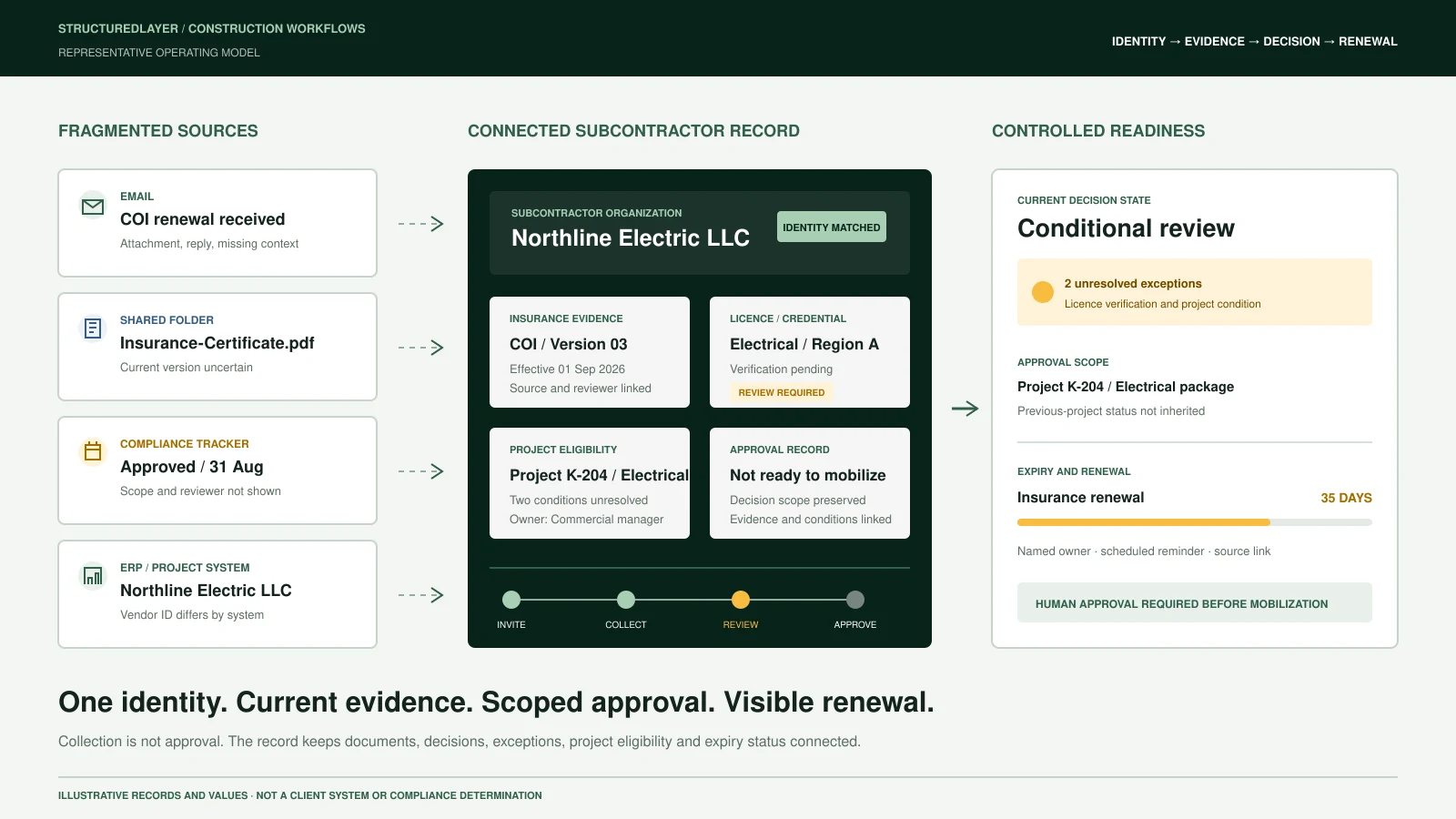
At StructuredLayer, we do not treat document collection as proof that a subcontractor is ready. We create a connected record that shows identity, evidence, review, approval, project eligibility, exceptions, and renewal status together.
This is a representative operating scenario created to explain the workflow. It is not presented as a named client case study, legal opinion, insurance determination, or compliance certification.
Five places can each hold a partial truth
Email
Insurance certificates, licences, tax forms, banking documents, correspondence, and missing-item requests.
Shared folders
Downloaded files organised by company name, project, document type, or date.
Accounting or ERP system
Vendor identity, payment details, tax status, internal vendor number, and financial holds.
Project-management platform
Project invitations, assigned work packages, project contacts, commitments, and site records.
Compliance spreadsheet
Document status, expiry dates, approval notes, trade eligibility, and manually maintained reminders.
Each source may contain valid information. The problem begins when the records are not connected and nobody knows which source controls the decision.
A controlled subcontractor path
01. Invite
Create an onboarding request linked to the proposed subcontractor, trade, project, work package, and responsible internal owner.
02. Identify
Confirm the legal company name, trading name, registration or tax identifier, addresses, contacts, service areas, and existing internal vendor records.
03. Collect
Request only the documents required for the applicable trade, project, contract, location, and risk category.
04. Validate
Check required fields, document type, named insured, policy dates, coverage values, licence information, signatures, and source authenticity where verification is available.
05. Review
Route unclear, missing, conflicting, or potentially insufficient evidence to the appropriate human reviewer.
06. Approve
Record the decision, approval scope, approving person, conditions, date, supporting evidence, and any restrictions.
07. Mobilize
Connect the approved subcontractor to the correct project, work package, site requirements, contacts, and onboarding obligations.
08. Monitor
Track expiry dates, renewal requests, project-specific conditions, policy changes, unresolved exceptions, and approval withdrawals.
What the team may have before
Subcontractors/
|-- ABC-Electrical/
|   |-- Insurance-Certificate.pdf
|   |-- W9-old.pdf
|   `-- Licence.jpg
|-- Approved-Vendors.xlsx
|-- Insurance-Tracker-FINAL-v4.xlsx
|-- Project-Contacts.xlsx
`-- Email/
    |-- Missing-items
    |-- Insurance-renewals
    `-- Approval-replies
The files exist, but the decision context does not.
A team member may find a certificate without knowing whether it was reviewed. Another person may see an "Approved" spreadsheet status without knowing which project, trade, or date that approval covered.
Where the workflow breaks
- The same subcontractor is entered under several names
- Parent companies and regional branches are confused
- Previous-project approval is assumed to apply everywhere
- Expired documents remain inside active folders
- Renewal files arrive without replacing the authoritative version
- Approval decisions remain inside email threads
- Project teams mobilize subcontractors before every condition is resolved
- Insurance, licensing, safety, finance, and project reviews are treated as one status
- Missing items are followed up manually
- Nobody owns unresolved exceptions
- Reporting counts uploaded files instead of approved subcontractors
The connected record model
We may structure the workflow around the following records:
Subcontractor organization
Legal name, trading name, organization ID, registration identifiers, addresses, status, trades, regions, and parent organization.
Contact
Contact ID, role, email, phone, project responsibility, communication preference, and organization relationship.
Document
Document ID, type, source, filename, received date, effective date, expiry date, version, status, and source link.
Insurance policy
Policy ID, insurer, broker, policy type, policy number, limits, effective period, certificate holder, exclusions, and review status.
Licence or certification
Credential ID, issuing authority, jurisdiction, trade, credential number, effective date, expiry date, verification source, and status.
Project eligibility
Project ID, subcontractor ID, work package, approval scope, required evidence, readiness status, restrictions, and responsible reviewer.
Exception
Exception ID, affected record, reason, severity, owner, due date, evidence, resolution, and escalation status.
Approval
Approval ID, decision, approving person, approval date, conditions, evidence reviewed, project scope, and withdrawal status.
Stable identifiers allow these records to remain connected even when company names, filenames, contacts, or software platforms change.
Decide which source controls each value
The workflow must define an authoritative source for every important field.
For example:
- The finance system may control the official vendor number
- The verified tax document may control the legal company name
- The insurance record may control policy dates and reviewed limits
- The licensing authority may control credential validity
- The project record may control work-package eligibility
- The approval record may control the final readiness decision
A dashboard should display these values, but it should not silently become authoritative simply because it is easier to view.
Where AI and automation may assist
We may use controlled AI and automation to:
- Classify incoming documents
- Extract names, dates, policy numbers, limits, and credential details
- Match documents to an existing subcontractor
- Detect missing or conflicting fields
- Compare a renewal against the previous version
- Draft missing-item and renewal requests
- Recommend a review queue
- Summarize unresolved exceptions
- Prepare project-readiness reports
- Alert owners before expiry dates
AI should not independently make final legal, insurance, safety, financial, or project-eligibility decisions.
A qualified person remains responsible for interpreting contractual requirements, confirming adequacy, accepting exceptions, and authorizing mobilization.
What the business receives
A controlled implementation may provide:
- One connected subcontractor register
- Defined legal-entity and duplicate-matching rules
- Project-specific eligibility records
- Document and credential registers
- Expiry and renewal monitoring
- Missing-item queues
- Review and approval histories
- Exception ownership and escalation
- Controlled dashboard views
- Source links for every material record
- Permissions based on role and responsibility
- Operating procedures and failure recovery
- Acceptance-testing records
- Training and client-owned handover documentation
The exact deliverables depend on the approved engagement scope and the systems involved.
Minimum acceptance test
Before the workflow is accepted, we would test whether it can:
- Create or match the correct subcontractor without producing an uncontrolled duplicate.
- Identify the required documents for the selected trade and project.
- Link every uploaded document to its source and responsible organization.
- Distinguish current, expired, superseded, missing, and unreviewed evidence.
- Route uncertain extraction or conflicting information to a person.
- Prevent an incomplete record from appearing fully approved.
- Record who approved the subcontractor, for what purpose, and under which conditions.
- Trigger a renewal process before an important expiry date.
- Show project teams the current readiness status without exposing restricted information.
- Preserve a reviewable history when documents, decisions, or eligibility change.
An illustrative time-value calculation
Suppose a team reviews and follows up with 60 subcontractors each month.
If fragmented records create an average of 18 minutes of avoidable searching, checking, renaming, and follow-up per subcontractor:
60 subcontractors x 18 minutes = 1,080 minutes
1,080 minutes / 60 = 18 hours per month
18 hours x $55 blended hourly cost = $990 per month
This is a planning example, not a promised saving.
The real value may also include fewer mobilization delays, clearer accountability, earlier expiry detection, more reliable project records, and lower exposure to decisions made from incomplete evidence.
Monitoring and recovery still matter
A production workflow requires more than successful document extraction.
We define:
- Scheduled health checks
- Failed-ingestion alerts
- Duplicate and uncertain-match queues
- Retry limits
- Manual fallback procedures
- Permission failures
- Expiry-monitoring checks
- Model or extraction changes
- Human escalation routes
- Incident records
- Rollback procedures
- A controlled way to disable automation without losing the underlying records
An automated workflow should stop visibly when it cannot proceed safely. It should never conceal uncertainty by inventing a successful result.
Practical recommendation
Begin with one subcontractor category, one active project, and a limited set of required documents.
Use approved historical examples to test identity matching, document extraction, expiry logic, exception handling, approvals, and project eligibility before introducing the workflow into live mobilization decisions.
Once the records and controls are reliable, the same foundation can support:
- Automated renewal reminders
- Project-specific compliance packs
- Subcontractor performance records
- Bid-list qualification
- Work-package invitations
- Contract and purchase-order preparation
- Site-access readiness
- Management reporting
- Controlled AI-assisted search
The objective is not simply to collect more files. It is to establish a reliable answer to a practical question:
Is this the correct subcontractor, with the required current evidence, reviewed by the right person, and approved for this specific work?
Insurance, licensing, tax, privacy, safety, and contractual requirements vary by jurisdiction and engagement. Appropriate professional review remains necessary.